Success is often treated as the best problem a business can have. More customers, more transactions, more website visitors, more data, and more employees usually mean a healthier business. But there is another side to growth that companies sometimes discover too late: Can your technology handle success?
A system that works perfectly for 500 users may struggle when 5,000 users arrive. A database that handles today’s transactions may become a bottleneck tomorrow. An infrastructure setup that feels reliable during normal traffic can become a security and performance risk when demand suddenly increases.
That is why scalability should not be treated as something to think about after growth happens. Businesses need to prepare technology for growth before growth exposes its weaknesses. From application architecture and cloud infrastructure to cybersecurity, databases, monitoring, and disaster recovery, every layer needs to be ready for increased demand.
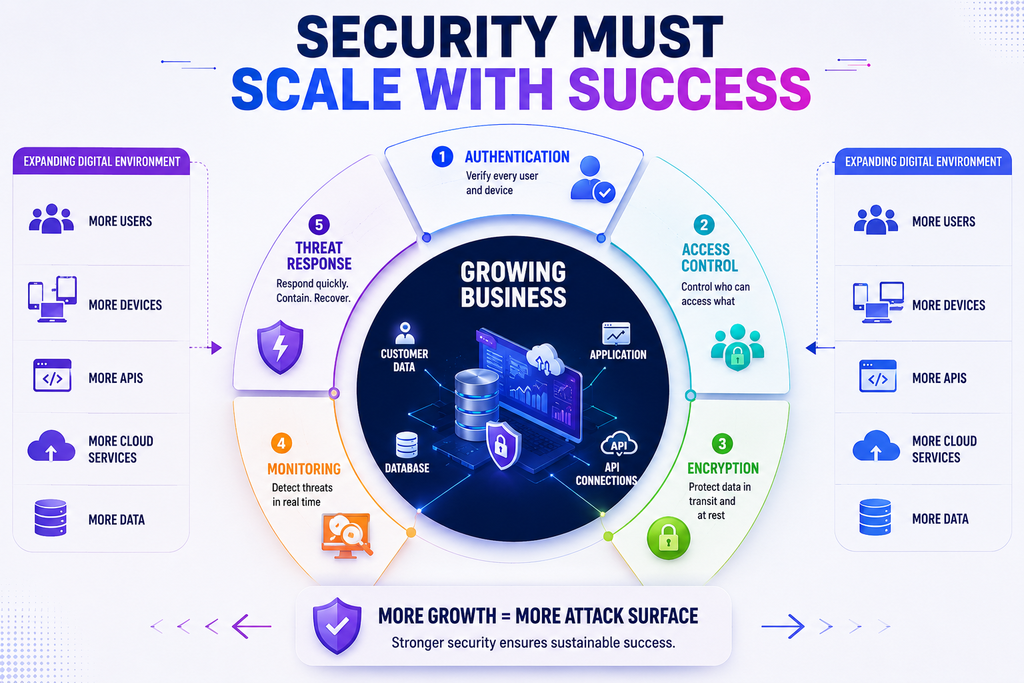
Security also becomes increasingly important as technology scales. As your systems, users, integrations, and data grow, the potential attack surface grows with them. Resources such as Botdef can help businesses and technology teams stay informed about security considerations while building a stronger foundation for growth.
The real question is not simply whether your technology works today.
The better question is whether it will continue working when your business becomes significantly larger.
What Does It Really Mean to Have Technology That Can Handle Success?
Technology scalability means a system can support increasing workloads without suffering unacceptable drops in performance, reliability, security, or user experience.
However, scalability is broader than simply adding more servers.
A scalable technology environment should be able to handle growth across several dimensions:
- More users
- More transactions
- More data
- More concurrent requests
- More integrations
- More employees
- More locations
- More security requirements
- More operational complexity
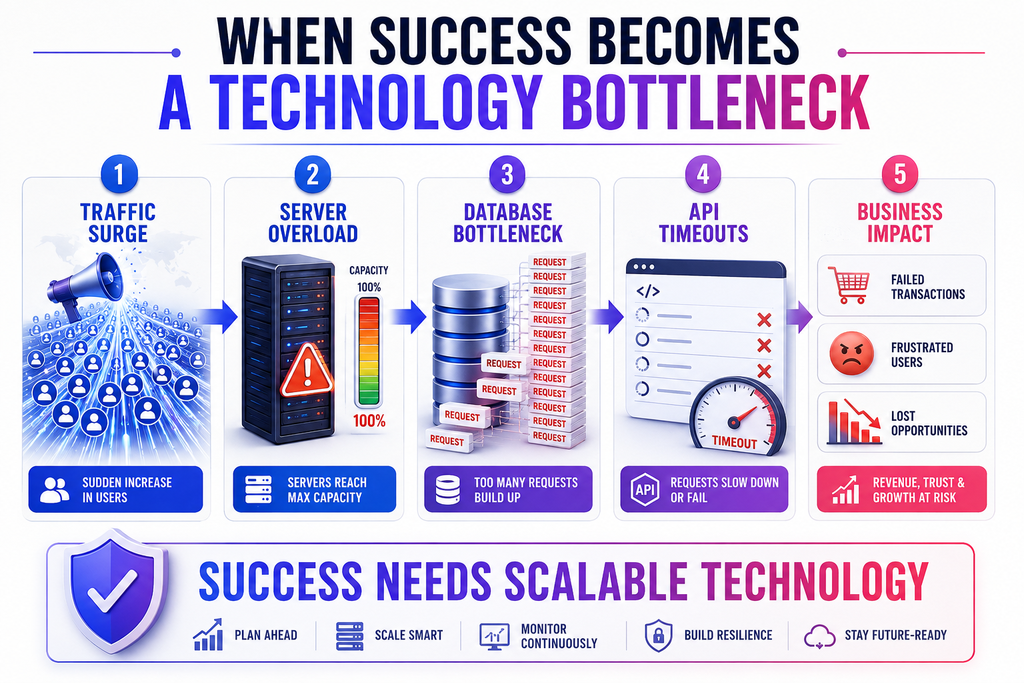
For example, imagine an online platform that normally receives 10,000 requests per day. Suddenly, a marketing campaign brings 500,000 requests in a short period.
If the application was designed only for its average workload, several things could happen:
- Pages become slow.
- APIs start timing out.
- Database queries become overloaded.
- Users receive errors.
- Transactions fail.
- Support requests increase.
- Security monitoring becomes harder.
- Revenue opportunities are lost.
The business may have achieved success, but its technology was not ready to support it.
The Hidden Technology Problems That Appear During Growth
Technology problems often remain invisible when a business is small.
A development team may manually manage deployments. A single database may be sufficient. One server may handle all application traffic. Monitoring may consist of checking whether the website is online.
As the organization grows, those same practices can become serious limitations.
1. Performance Bottlenecks
Performance problems are among the first signs that infrastructure is struggling.
A slow application does not always mean the server needs more CPU or memory. The real problem could be:
- Inefficient database queries
- Poorly optimized APIs
- Large media files
- Excessive network requests
- Missing caching
- Poor application architecture
- Inefficient background processing
Performance testing should therefore examine the entire technology stack rather than focusing on one component.
2. Database Limitations
Databases frequently become critical bottlenecks as applications grow.
More users generate more records. More records create larger indexes and tables. More transactions produce more read and write operations.
Eventually, a database that was perfectly adequate during the early stages may require:
- Query optimization
- Index optimization
- Read replicas
- Partitioning
- Connection pooling
- Caching
- Database scaling
- Archiving strategies
The important point is to identify these possibilities before the database becomes an emergency.
3. Infrastructure That Cannot Scale Quickly
Traditional infrastructure can work well for predictable workloads, but modern applications often experience demand fluctuations.
Cloud infrastructure can provide more flexibility through approaches such as auto-scaling, load balancing, managed databases, and distributed services.
The goal is not to use cloud technology simply because it is popular. The goal is to build infrastructure that matches the organization’s workload and growth model.
Can Your Technology Handle Success? Start With Scalability
If you are asking “Can your technology handle success?”, scalability should be one of the first areas you evaluate.
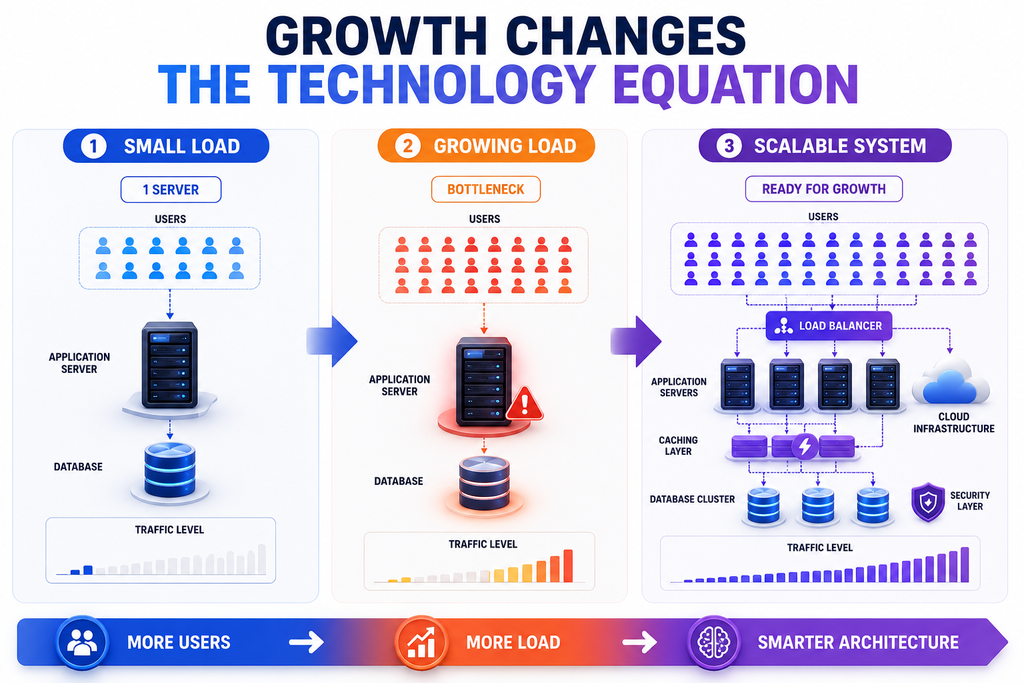
There are two major forms of scalability.
Vertical Scaling
Vertical scaling means increasing the resources of an existing system.
For example:
- More CPU
- More RAM
- Faster storage
- Greater network capacity
It can be relatively straightforward, but it eventually reaches physical or architectural limits.
Horizontal Scaling
Horizontal scaling means adding more instances or machines to distribute workload.
For example, instead of relying on one application server, a business could operate several application instances behind a load balancer.
Horizontal scaling can provide greater flexibility, particularly when applications are designed to be stateless and workloads can be distributed effectively.
Why Both Matter
There is no universal scalability strategy.
A business may use vertical scaling for certain database workloads while using horizontal scaling for application servers. Caching, queues, content delivery networks, and managed cloud services can further improve performance.
The right approach depends on:
- Application architecture
- Traffic patterns
- Budget
- Data requirements
- Availability objectives
- Security requirements
- Expected growth
Build for Growth Instead of Reacting to It
One of the biggest technology mistakes businesses make is waiting until systems fail before improving them.
Reactive scaling often looks like this:
Traffic increases → system slows down → emergency investigation → temporary fix → traffic increases again.
A proactive strategy looks different:
Growth forecast → capacity planning → performance testing → infrastructure improvements → monitoring → continuous optimization.
The second approach is more predictable.
Conduct Capacity Planning
Capacity planning helps organizations estimate what their technology environment will need in the future.
Consider questions such as:
- How many users do we expect next year?
- What percentage of traffic could increase during peak periods?
- How quickly is our database growing?
- Which APIs receive the highest traffic?
- Which services are most resource-intensive?
- What happens if traffic suddenly doubles?
- What happens if traffic increases tenfold?
These questions turn growth from an unknown event into something the technical team can prepare for.
Security Must Scale Alongside Technology
Growth does not only create performance challenges. It can also create security challenges.
A growing organization usually has more accounts, endpoints, applications, APIs, cloud resources, third-party integrations, and data.
Consequently, security cannot remain a small operational task.
A useful security strategy should include:
- Strong authentication
- Multi-factor authentication where appropriate
- Role-based access controls
- Secure API design
- Encryption
- Vulnerability management
- Logging and monitoring
- Backup protection
- Incident response procedures
- Regular security assessments
The OWASP Top 10 is a useful industry resource for understanding common web application security risks. Organizations can use it as one reference point when reviewing application security as their systems evolve.
Similarly, the NIST Cybersecurity Framework provides a structured approach for managing cybersecurity risks.
The key lesson is simple: security should be designed into scalable technology rather than added after the system becomes large.
Your Architecture Matters More Than You Think
A system can have powerful servers and still fail under growth if its architecture is poorly designed.
Architecture determines how different parts of an application communicate and distribute workload.
For example, a well-designed application might separate:
- User interface
- Application services
- Authentication
- Database operations
- Background jobs
- File storage
- Notifications
- Reporting
- Monitoring
This separation can make individual components easier to optimize and scale.
Monolithic vs. Distributed Architecture
A monolithic architecture is not automatically bad.
For many businesses, a well-designed monolith can be easier to develop, deploy, and maintain.
Problems appear when the application becomes tightly coupled and difficult to scale independently.
A distributed or service-oriented architecture can provide more flexibility, but it also introduces additional complexity.
Therefore, businesses should avoid adopting complex architecture simply because it sounds more scalable.
The best architecture is the simplest architecture that can reliably support the business’s expected requirements.
APIs Can Become a Growth Bottleneck
Modern applications depend heavily on APIs.
As applications grow, APIs may handle thousands or millions of requests. Poor API design can therefore become a major performance and security problem.
Important considerations include:
- Request validation
- Authentication and authorization
- Rate limiting
- Pagination
- Caching
- Timeout handling
- Error management
- API monitoring
- Version management
For example, returning thousands of database records in a single API response may work during development. As the dataset grows, that same endpoint can become extremely slow.
Pagination can significantly reduce the amount of data processed per request.
Likewise, rate limiting can help prevent abusive traffic from overwhelming resources.
Monitoring Is Your Early-Warning System
You cannot manage technology effectively if you cannot see what is happening.
Monitoring should provide visibility into system health before users start reporting problems.
Useful metrics include:
- CPU utilization
- Memory usage
- Database performance
- API response time
- Error rates
- Request volume
- Network activity
- Queue length
- Storage utilization
- Authentication failures
However, monitoring should not focus only on infrastructure.
Business metrics matter too.
For example:
A server may report healthy resource usage while customers are still unable to complete payments.
That is why technical monitoring should eventually connect with business-critical user journeys.
Use Alerts Carefully
Too many alerts create noise.
Teams should prioritize alerts that indicate meaningful problems, such as:
- Sustained high error rates
- Critical database failures
- Unexpected traffic spikes
- Authentication anomalies
- Service downtime
- Storage capacity warnings
- Failed background jobs
Effective monitoring gives teams time to respond before a small problem becomes a major incident.
Test What Happens When Things Go Wrong
A technology system should not only be tested under normal conditions.
Teams should also understand how it behaves under stress.
Useful testing approaches include:
Load Testing
Simulate expected levels of traffic to determine whether the system performs as designed.
Stress Testing
Push the system beyond normal capacity to identify its breaking point.
Spike Testing
Suddenly increase traffic to determine how the infrastructure reacts to unexpected demand.
Failover Testing
Intentionally test the failure of critical components and verify that backup systems work correctly.
These tests answer a critical question:
When something goes wrong, does the system fail gracefully or collapse completely?
Backups Are Part of Scalability
As businesses grow, data becomes increasingly valuable.
A backup strategy should therefore evolve with the organization.
Consider:
- How frequently backups are created
- Where backups are stored
- How long they are retained
- Whether backups are encrypted
- Whether backups are isolated from production
- How quickly data can be restored
- Whether restoration has been tested
A backup that has never been tested is not a complete recovery strategy.
Teams should periodically perform restoration exercises to confirm that backups are actually usable.
This is particularly important for organizations handling customer information, financial records, business-critical applications, or other sensitive data.
Third-Party Dependencies Can Also Limit Growth
Your technology may be scalable, but your external dependencies might not be.
Modern applications often depend on third-party services for:
- Payments
- Email delivery
- Authentication
- Analytics
- Cloud storage
- Messaging
- Maps
- CRM integrations
- Identity verification
If one external service has strict rate limits or downtime, your application may experience problems even when your own infrastructure is healthy.
Therefore, evaluate critical dependencies regularly.
Ask:
- What happens if this service becomes unavailable?
- Does it have rate limits?
- Is there a fallback?
- How quickly can we replace it?
- Are we overly dependent on one provider?
- What happens if pricing changes?
Technology resilience extends beyond your own servers.
The Human Side of Technology Scalability
Scalable technology requires scalable processes.
A development team that grows from three people to thirty cannot rely on informal communication and undocumented procedures forever.
As organizations expand, they should establish:
- Deployment procedures
- Documentation
- Access management
- Incident response processes
- Code review standards
- Testing practices
- Change management
- Security responsibilities
- Ownership of critical systems
Documentation becomes especially important when the person who originally built a system is no longer available.
A system should never depend entirely on one person’s memory.
A Practical Technology Readiness Checklist
Before expecting significant business growth, evaluate the following areas:
Infrastructure
- Can servers scale with demand?
- Is load balancing configured where necessary?
- Are critical services redundant?
Application
- Are major APIs optimized?
- Can application instances scale independently?
- Are background tasks handled efficiently?
Database
- Are queries optimized?
- Are indexes reviewed regularly?
- Is database capacity monitored?
- Is there a tested backup and recovery process?
Security
- Are access permissions reviewed?
- Are critical systems protected with strong authentication?
- Are vulnerabilities identified and addressed?
- Is security monitoring in place?
Reliability
- Are critical services monitored?
- Are alerts configured?
- Have failure scenarios been tested?
- Is there a documented incident response process?
Growth
- Has capacity planning been completed?
- Have realistic traffic scenarios been tested?
- Are technology costs expected to remain sustainable?
A system does not need to be perfect in every category. However, identifying weaknesses early gives the organization time to address them before growth turns those weaknesses into emergencies.
The Cost of Waiting Can Be Higher Than the Cost of Preparing
Technology improvements often feel expensive when everything is working.
It can be tempting to say:
“We will optimize it when we grow.”
The problem is that growth can arrive faster than expected.
A successful campaign, viral product, major customer, seasonal event, or sudden market opportunity can increase demand almost overnight.
When technology is not prepared, the business may face:
- Lost revenue
- Customer frustration
- Emergency development costs
- Operational disruption
- Security incidents
- Reputation damage
- Employee burnout
Preparation is not about predicting the future perfectly.
It is about creating enough flexibility to respond when the future arrives.
How to Build a Technology Growth Strategy
A practical approach can start with five steps.
Step 1: Understand Your Current Capacity
Measure current traffic, resource usage, database size, API performance, and infrastructure costs.
Step 2: Identify Your Weakest Components
Find the components most likely to become bottlenecks.
Step 3: Define Growth Scenarios
Model realistic scenarios such as 2x, 5x, and 10x increases in demand.
Step 4: Test Before You Need It
Run load, stress, and failover tests before major growth events.
Step 5: Monitor and Improve Continuously
Scalability is not a one-time project. Technology, customers, workloads, and threats continue to change.
Businesses looking to strengthen their overall technology and security awareness can also explore relevant resources through the Botdef security blog, where security-focused topics can help teams think more proactively about protecting growing digital environments.
Success Should Not Become Your Biggest Technical Risk
Growth should be exciting.
When customers increase, transactions rise, and demand accelerates, technology should enable that momentum rather than become the reason it stops.
The question “Can your technology handle success?” should therefore be part of every organization’s technology planning conversation.
Scalability is not only about adding servers. It involves architecture, databases, APIs, infrastructure, monitoring, security, backups, people, processes, and third-party dependencies.
Most importantly, scalability should be proactive.
Do not wait for your first major outage to discover that your infrastructure cannot handle your success. Test it. Monitor it. Secure it. Improve it.
Because the strongest technology environment is not the one that survives today’s workload.
It is the one prepared for tomorrow’s growth.
For businesses reviewing their technology security posture as they scale, Botdef’s security resources can also be a useful starting point for discovering practical security information and keeping important security considerations in the conversation.