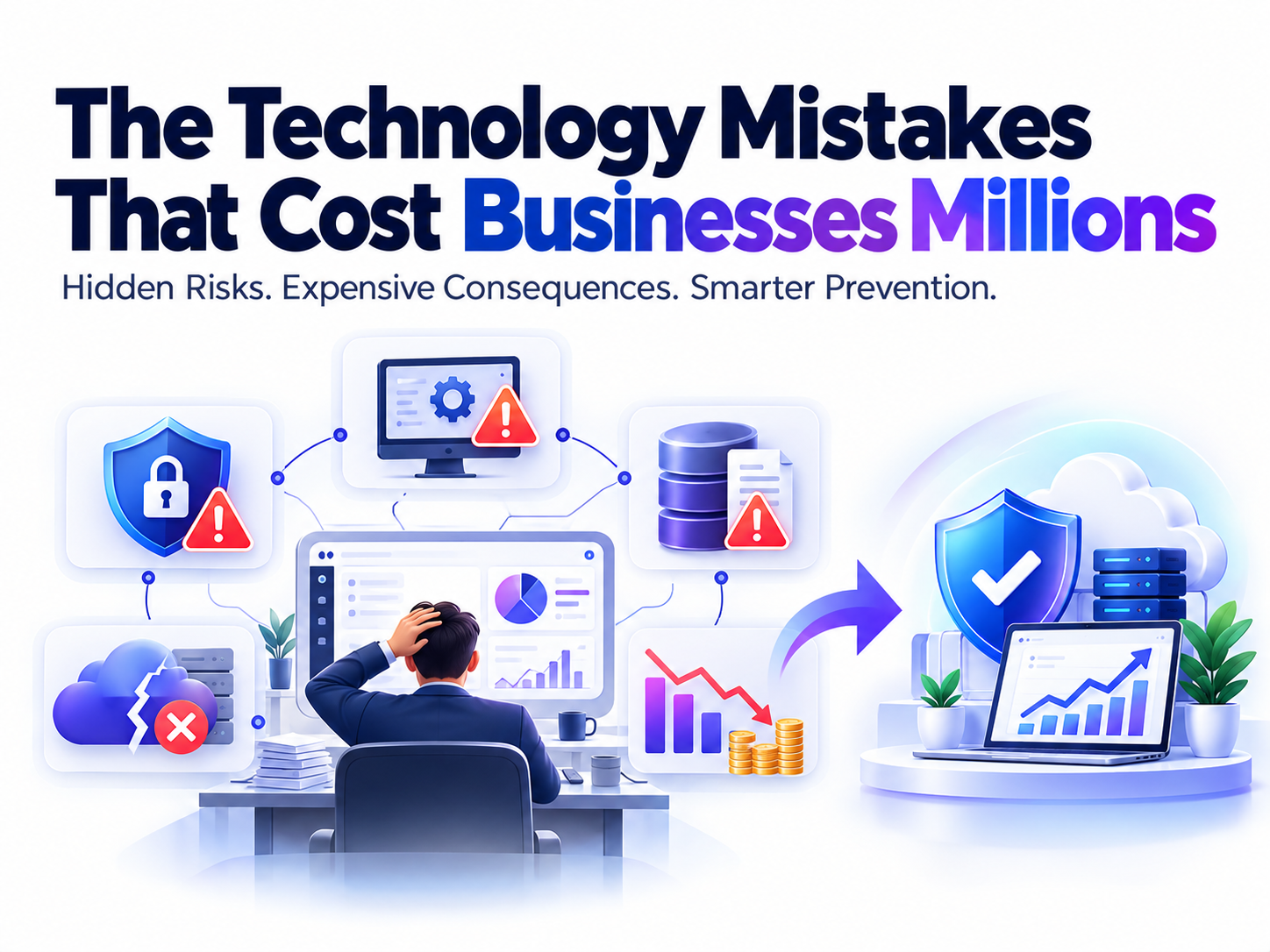
Technology has become the backbone of modern businesses. From managing customer information and processing payments to supporting remote teams and protecting confidential data, companies depend on digital systems to operate efficiently. However, while technology creates opportunities for growth, it can also introduce serious risks when businesses make the wrong decisions.
The technology mistakes that cost businesses millions are not always the result of sophisticated cyberattacks or major system failures. Sometimes, they begin with something as simple as an outdated software application, a weak password, an overlooked security update, or an unreliable backup strategy. Over time, these seemingly minor problems can lead to financial losses, operational disruptions, regulatory penalties, and damaged customer relationships.
For growing businesses, the consequences can be particularly severe. A single security incident may interrupt daily operations, expose sensitive information, or force a company to spend significant resources on recovery. In some cases, the damage extends beyond immediate expenses and affects the organization’s reputation for years.
According to IBM’s Cost of a Data Breach Report, data breaches can involve substantial financial costs, including incident response, business interruption, legal expenses, and customer notification. Although the impact varies by organization and incident, the financial consequences demonstrate why technology risk deserves serious attention.
At Botdef, the focus is on helping readers understand the security challenges businesses face and the practical steps they can take to address them. Staying secure in today’s digital world is not just an option; it is a necessity.
The good news is that many expensive technology mistakes are preventable. Businesses do not need to eliminate every risk or invest in every new technology. Instead, they need to make informed decisions, establish reliable security practices, and regularly evaluate the systems they depend on.
This guide explores the most expensive technology mistakes businesses make, explains why they happen, and outlines practical ways to avoid them.
1. Ignoring Cybersecurity Until Something Goes Wrong
One of the most damaging technology mistakes a business can make is treating cybersecurity as an occasional task rather than an ongoing responsibility.
Some organizations invest in security only after experiencing a breach. Others assume that cybercriminals target only large corporations and that smaller companies are unlikely to attract attention.
Both assumptions create unnecessary risk.
Cybercriminals often look for weaknesses they can exploit with minimal effort. These weaknesses may include exposed services, stolen credentials, outdated applications, or employees who have not received adequate security training.
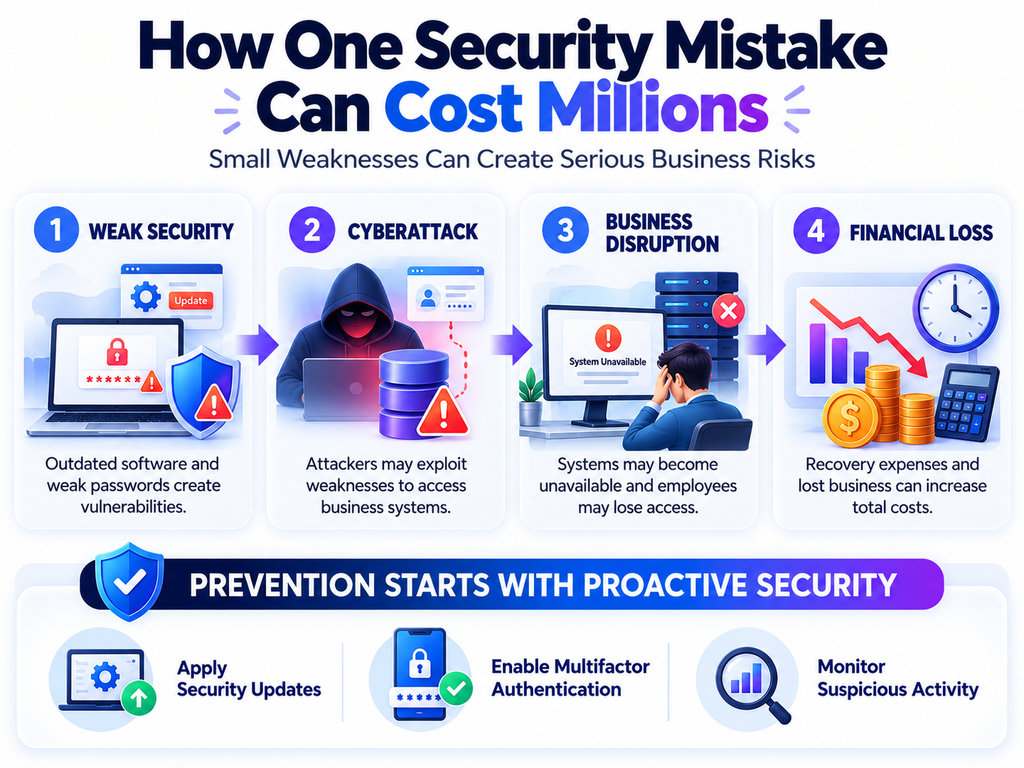
How weak security creates financial losses
A successful cyberattack can affect almost every part of a business.
For example, an attacker who gains access to an employee’s account may steal customer information, send fraudulent payment requests, or move deeper into the company’s network. If the attacker reaches critical systems, the organization may need to suspend operations while investigating and resolving the incident.
The resulting expenses can include:
- Incident investigation and forensic analysis.
- Emergency security services and system recovery.
- Legal consultations and regulatory notifications.
- Customer support and compensation.
- Lost sales during operational downtime.
- Reputation management and customer retention efforts.
The financial impact depends on the nature of the attack, the data involved, and the organization’s ability to respond.
How businesses can avoid this mistake
Cybersecurity should be part of everyday business operations rather than a separate activity performed once a year.
Start with a practical security foundation:
- Enable multifactor authentication (MFA) for important accounts.
- Use strong, unique passwords managed through a reputable password manager.
- Apply security updates promptly.
- Restrict access to sensitive information.
- Monitor systems for suspicious activity.
- Train employees to recognize phishing and social engineering.
- Maintain an incident response plan.
Businesses should also assess their security regularly. A useful starting point is the NIST Cybersecurity Framework, which provides guidance for understanding, assessing, and managing cybersecurity risks.
The objective is not simply to purchase security products. It is to build a system in which risks are identified early and addressed consistently.
2. Using Outdated Software and Operating Systems
Software updates sometimes appear inconvenient. They may require restarting devices, testing applications, or scheduling maintenance outside business hours.
As a result, businesses occasionally postpone updates for weeks or months.
Unfortunately, delaying important security patches can leave known vulnerabilities exposed to attackers.
Why outdated technology becomes expensive
Software developers regularly release updates to fix bugs, improve performance, and address security vulnerabilities. When businesses continue using unsupported software, they may lose access to essential security fixes.
Attackers can take advantage of publicly known weaknesses, particularly when organizations fail to apply available patches.
Consider a business that uses an outdated server to store customer records. A vulnerability in its operating system allows an attacker to gain unauthorized access. The company may then face data exposure, interrupted services, investigation costs, and recovery expenses.
The original problem was a delayed update. The consequences could affect the entire organization.
Outdated software can also create compatibility problems. Legacy applications may not work with modern systems, making integrations more difficult and increasing maintenance costs.
Practical ways to reduce software risks
Businesses should establish a clear patch management process.
This process should include:
- Maintain an inventory: Identify the operating systems, applications, servers, and devices used across the organization.
- Identify unsupported software: Determine which products no longer receive security updates.
- Prioritize vulnerabilities: Address actively exploited vulnerabilities and weaknesses affecting critical systems first.
- Test important updates: Check whether updates affect essential business applications.
- Schedule deployment: Apply approved patches within defined time frames based on risk.
- Verify completion: Confirm that updates were successfully installed.
If an application cannot be updated immediately, consider isolating it from sensitive systems, restricting network access, and planning a replacement.
The key lesson is simple: maintaining software is not merely an IT responsibility. It is an important investment in business continuity.
3. Underestimating the Financial Impact of Data Breaches
Customer information, employee records, financial documents, and business communications are valuable assets. Yet some organizations fail to protect them according to their importance.
This mistake often occurs when businesses focus on preventing visible operational problems while overlooking the long-term consequences of information exposure.
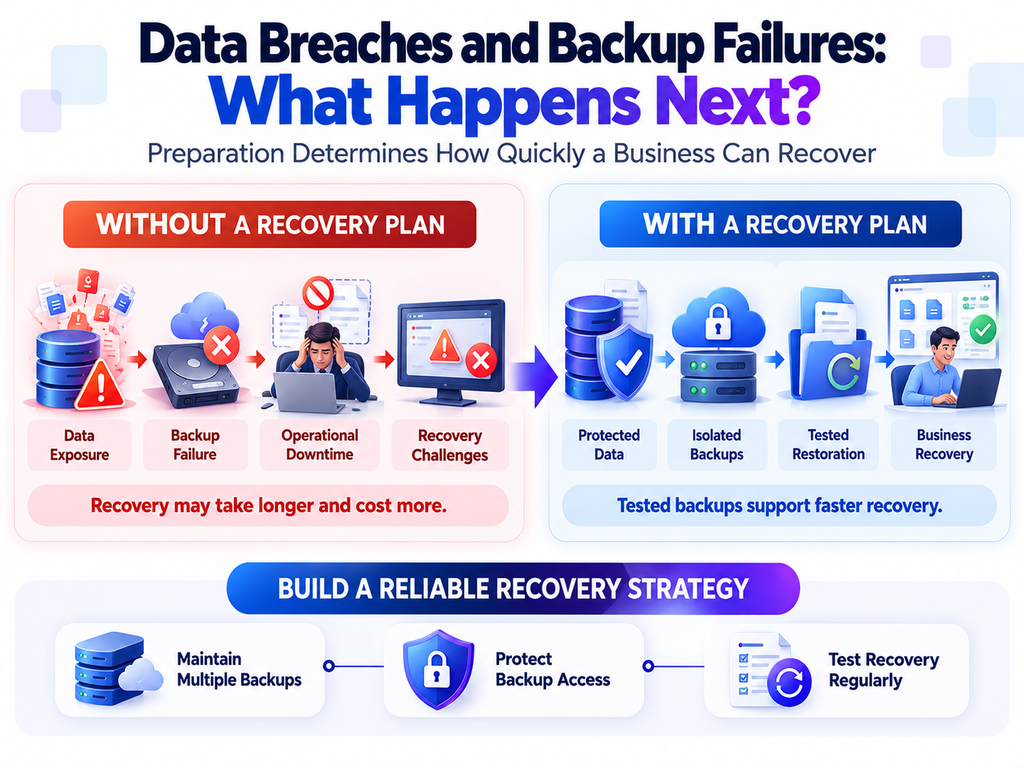
The hidden costs of a data breach
A data breach involves more than the possible loss of confidential information.
Once sensitive data is exposed, an organization may need to investigate what happened, determine which individuals were affected, secure compromised systems, and notify relevant parties.
Depending on the circumstances and applicable laws, the company may also face regulatory investigations, contractual disputes, or legal claims.
The indirect costs can be equally serious.
Customers may move to competitors if they lose confidence in the organization’s ability to protect their information. Business partners may reconsider existing agreements, and potential customers may hesitate before sharing their data.
For example, imagine an online retailer that stores customer contact details and order information without appropriate access controls. An attacker compromises an employee account and downloads the records.
Even if payment information remains secure, the retailer may still need to investigate the incident, notify affected customers where required, strengthen its security, and address customer concerns.
The cost of the incident extends far beyond the original account compromise.
How to protect sensitive business information
Organizations should adopt a data protection strategy that covers the entire information lifecycle.
Important measures include:
- Data classification: Identify public, internal, confidential, and highly sensitive information.
- Access restrictions: Give employees access only to the information necessary for their roles.
- Encryption: Protect sensitive information during transmission and, where appropriate, while stored.
- Retention policies: Delete information when there is no legitimate reason to keep it.
- Monitoring: Track access to critical records and investigate unusual activity.
- Secure disposal: Remove sensitive information safely when devices or storage systems are retired.
Businesses should also understand their legal and contractual obligations concerning personal information.
The goal is to reduce the amount of sensitive data exposed to potential attackers and limit the consequences if a security incident occurs.
4. Treating Backups as an Afterthought
A backup strategy is one of the most important safeguards against data loss. However, many businesses discover the weaknesses in their backups only after an incident.
Some organizations create backups but never test whether they can restore the information. Others store every backup in the same environment as their primary systems.
These approaches can create a false sense of security.
Why unreliable backups can cost millions
Data can disappear for several reasons, including accidental deletion, hardware failure, software errors, ransomware, and natural disasters.
When reliable backups are unavailable, businesses may lose important records, interrupt customer services, and spend considerable time rebuilding systems.
Ransomware presents a particular challenge because attackers may attempt to encrypt production data and compromise connected backups.
Even when backups exist, recovery can fail if files are corrupted, credentials are unavailable, or the restoration process takes longer than the business can tolerate.
For an organization that depends on digital transactions, prolonged downtime may mean lost revenue, delayed deliveries, missed deadlines, and dissatisfied customers.
Building a reliable backup and recovery strategy
A useful starting point is the 3-2-1 backup rule:
- Keep at least three copies of important data.
- Store those copies on at least two different types of storage media or systems.
- Keep at least one copy off-site or otherwise isolated from the primary environment.
Organizations should also consider immutable backups, which cannot be altered or deleted during a defined retention period, and offline backups that remain disconnected from production systems.
However, creating backups is only part of the solution.
Businesses should regularly test restoration procedures to confirm that their data and applications can be recovered successfully.
They should also define two important recovery targets:
- Recovery Point Objective (RPO): The maximum amount of data loss the business can tolerate, measured in time.
- Recovery Time Objective (RTO): The target time within which a system or service should be restored.
For example, a company processing frequent online transactions may require a shorter RPO than an organization that updates a noncritical internal document repository once a day.
Recovery targets should reflect actual business requirements rather than arbitrary technical preferences.
A tested backup system can turn a potentially devastating incident into a manageable operational problem.
5. Choosing Technology Based Only on Price
Reducing expenses is a sensible business objective. Nevertheless, choosing technology solely because it has the lowest initial price can create much larger costs later.
A low-cost solution may lack essential security features, integration capabilities, technical support, or room for future growth.
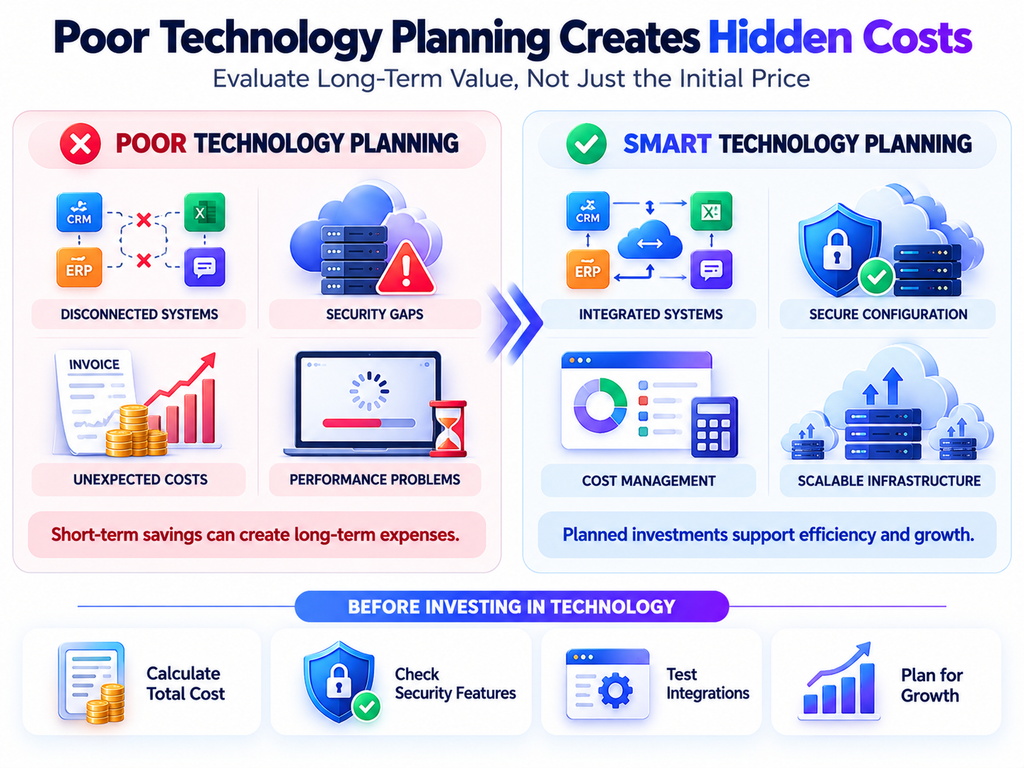
The difference between purchase price and total cost
The initial purchase price represents only one part of a technology investment.
Businesses should also consider:
- Installation and configuration.
- Employee training.
- Maintenance and support.
- Security monitoring.
- Integration with existing applications.
- Subscription and licensing fees.
- Future upgrades.
- Migration and replacement costs.
Suppose a company chooses an inexpensive customer management platform that cannot integrate properly with its accounting software.
Employees may need to enter the same information into multiple systems. This creates additional work, increases the possibility of mistakes, and makes reporting less reliable.
Eventually, the company may need to pay for custom integrations or migrate to another platform.
The original savings may disappear quickly.
How to make smarter technology investments
Before purchasing a product or service, evaluate its total cost of ownership (TCO).
Compare the available options against business requirements, security needs, usability, and expected growth.
Ask practical questions:
- Does the solution support our current workflows?
- Can it integrate with our existing systems?
- Does it provide the security controls we need?
- What support is available if something fails?
- Can it handle increased demand?
- How difficult would it be to switch providers?
- What additional expenses might appear after implementation?
A technology solution should deliver measurable business value rather than simply offer the lowest price.
The right investment may cost more initially but reduce operational expenses, security risks, and maintenance requirements over time.
6. Failing to Train Employees on Technology and Security
Businesses frequently invest in software, security tools, and infrastructure while overlooking the people who use those systems every day.
However, employees play a major role in protecting business information.
A single mistake, such as approving a fraudulent payment request or entering credentials into a fake login page, can expose an organization to significant financial losses.
How human error creates business risk
Cybercriminals often use phishing emails, impersonation, fake invoices, and urgent payment requests to manipulate employees.
For example, an employee receives an email that appears to come from a senior manager requesting an urgent transfer to a new bank account.
If the employee follows the instructions without verifying the request, the business may lose money through payment fraud.
In another scenario, an employee downloads an attachment from an untrusted sender. The attachment installs malicious software that compromises the employee’s device and potentially exposes other systems.
These incidents do not necessarily occur because employees are careless. They may happen because staff members lack clear procedures, practical training, or sufficient time to verify unusual requests.
Creating a security-aware workplace
Effective security training should be practical, regular, and relevant to employees’ responsibilities.
Organizations should teach employees how to:
- Recognize suspicious emails and unexpected attachments.
- Verify payment changes through an independent communication channel.
- Create and protect strong passwords.
- Use MFA correctly.
- Handle customer information responsibly.
- Report unusual account activity.
- Follow company procedures when using personal devices or working remotely.
Training should also explain what employees must do when something goes wrong.
A reporting process that encourages employees to raise concerns quickly can help organizations respond before an incident becomes more serious.
For example, if an employee reports entering a password on a suspicious website immediately, the security team may be able to reset the password, revoke active sessions, and investigate the account before further damage occurs.
Businesses should treat employees as an essential part of their security strategy, not simply as a potential source of mistakes.
7. Ignoring Access Controls and Employee Permissions
Another costly technology mistake is allowing employees, contractors, and third-party providers to access more information than they need.
This often happens when organizations grow quickly and account permissions are not reviewed regularly.
An employee may change departments but retain access to previous systems. A former contractor may keep an active account after completing a project. A shared administrator account may be used by several people without clear accountability.
Each situation increases unnecessary risk.
Why excessive permissions are dangerous
If an attacker compromises an account with extensive privileges, the attacker may be able to access sensitive records, change system settings, create additional accounts, or disable security controls.
Excessive permissions also increase the impact of accidental mistakes.
For example, an employee who only needs to view customer records should not automatically have permission to delete the entire database.
Restricting unnecessary access reduces the potential damage caused by compromised accounts and human error.
Applying the principle of least privilege
The principle of least privilege means giving users and applications only the permissions necessary to perform their assigned tasks.
Businesses can implement this principle by:
- Assigning role-based access permissions.
- Requiring stronger authentication for privileged accounts.
- Using separate administrator accounts for administrative work.
- Reviewing permissions regularly.
- Removing access promptly when employees leave or change roles.
- Avoiding shared accounts wherever possible.
- Monitoring sensitive administrative activity.
Organizations should also review access granted to external service providers and software integrations.
A vendor may need access to one application without requiring access to the company’s entire network.
Clear permission boundaries help contain security incidents and make systems easier to manage.
8. Rushing Cloud Migration Without Proper Planning
Cloud computing allows businesses to scale resources, improve flexibility, and access services without maintaining every component of their own infrastructure.
However, moving systems to the cloud does not automatically make them secure, reliable, or cost-effective.
A poorly planned migration can introduce configuration errors, unexpected expenses, integration problems, and service interruptions.
Common cloud migration mistakes
One frequent mistake is moving applications without first understanding their dependencies.
An application may rely on a database, an authentication service, a third-party integration, or a specific network configuration. If these dependencies are overlooked, the application may stop working correctly after migration.
Another common problem is misconfiguration.
For example, a cloud storage resource may be unintentionally accessible to the public, exposing confidential documents. Alternatively, unnecessary cloud resources may remain active and generate expenses long after a project ends.
Businesses can also underestimate the effort required to transfer data, test applications, train employees, and establish monitoring.
How to make cloud migration safer
A successful migration begins with planning.
First, inventory existing applications and identify which systems should move, remain in place, or be replaced.
Next, establish security and operational requirements before transferring important data.
A practical migration plan should include:
- Discovery: Identify applications, databases, integrations, and dependencies.
- Risk assessment: Determine the security, compliance, and availability requirements of each workload.
- Cost estimation: Calculate expected infrastructure, storage, licensing, and support expenses.
- Pilot migration: Test the approach with a low-risk workload.
- Security configuration: Establish appropriate identity permissions, network restrictions, encryption, and logging.
- Testing: Verify performance, functionality, access controls, and data integrity.
- Monitoring: Track system performance, security events, and resource costs after migration.
Businesses should also understand the shared responsibility model used by their cloud provider.
The provider may secure the underlying infrastructure, while the customer remains responsible for areas such as user permissions, data classification, and application configuration.
Clear ownership prevents important security tasks from being overlooked.
9. Building Technology Without Considering Scalability
Technology that works well for a small business may struggle when the organization expands.
An application may perform adequately with a few hundred users but become slow or unreliable when thousands of customers begin using it simultaneously.
This problem often occurs when businesses focus entirely on immediate requirements without considering future demand.
How poor scalability affects revenue
Performance problems can directly affect customer experience.
For example, an online store may experience a sudden increase in traffic during a seasonal promotion. If its infrastructure cannot handle the demand, customers may encounter slow pages, failed payments, or unavailable services.
Some customers will wait and try again. Others will abandon their purchases and visit competitors.
Internal systems can experience similar problems. A poorly designed reporting application may take hours to process information as the company’s database grows.
Employees then spend more time waiting for systems to respond, reducing productivity across the organization.
Planning technology for growth
Scalability does not mean building the largest possible system from the beginning.
Instead, businesses should identify likely growth requirements and design systems that can expand without unnecessary complexity.
Important considerations include:
- Expected user growth.
- Database size and performance.
- Peak traffic and seasonal demand.
- Integration requirements.
- Infrastructure capacity.
- Monitoring and alerting.
- Disaster recovery.
- Maintenance and upgrade procedures.
Load testing can help developers understand how an application performs under expected and unusually high demand.
Performance monitoring can also identify resource limitations before they become major operational problems.
By planning for realistic growth scenarios, businesses can avoid emergency infrastructure changes and expensive redesigns.
10. Neglecting Technology Maintenance and Documentation
Technology systems require ongoing maintenance. Yet businesses sometimes direct all their attention toward new projects while allowing existing infrastructure to become increasingly difficult to manage.
Over time, undocumented processes, obsolete dependencies, and inconsistent configurations can make even routine changes risky.
The hidden cost of technical debt
Technical debt develops when an organization chooses a quick technical solution that creates additional work or limitations later.
Some technical debt is intentional and manageable. However, problems arise when businesses repeatedly postpone necessary improvements without understanding the consequences.
For example, an application may depend on an outdated software library that only one developer understands.
When that developer leaves, the company may struggle to maintain the application, fix security vulnerabilities, or introduce new features.
A seemingly minor maintenance issue can eventually become a business continuity problem.
Building a sustainable maintenance process
Organizations should maintain accurate documentation for critical systems.
This documentation should explain:
- System architecture and important dependencies.
- Deployment and rollback procedures.
- Backup and recovery instructions.
- Access management processes.
- Monitoring and alerting requirements.
- Third-party services and integration details.
- Maintenance responsibilities.
Regular code reviews, dependency updates, infrastructure assessments, and technical audits can help identify problems before they become expensive.
Businesses should also ensure that important systems do not depend entirely on one individual’s undocumented knowledge.
Good documentation reduces operational uncertainty, supports smoother employee transitions, and makes incident recovery more efficient.
11. Failing to Prepare for Technology Failures and Cyberattacks
Even organizations with strong security controls can experience incidents.
Hardware can fail, employees can make mistakes, third-party services can become unavailable, and attackers can discover new vulnerabilities.
The costly mistake is assuming that these events will never happen.
Why an incident response plan matters
When an incident occurs, teams must make decisions quickly.
Without a clear plan, employees may not know whom to contact, which systems to isolate, how to preserve evidence, or when to notify customers and regulators.
Confusion can delay containment and increase the impact of the incident.
For example, a business experiencing ransomware may continue operating compromised systems because staff members are unsure how to respond. This can allow the incident to spread to additional devices and shared resources.
A documented incident response process helps teams act in a coordinated manner.
What an effective response plan should include
A practical incident response plan should define:
- Responsibilities: Identify the people responsible for technical response, business decisions, communications, and legal coordination.
- Detection and reporting: Explain how employees should report suspected incidents.
- Containment: Establish procedures for isolating affected systems and restricting compromised accounts.
- Investigation: Describe how teams will assess the incident and preserve relevant evidence.
- Recovery: Document how systems and data will be restored safely.
- Communication: Identify who communicates with employees, customers, partners, and relevant authorities.
- Lessons learned: Require a review after the incident to identify improvements.
Organizations should test their plans through tabletop exercises and recovery simulations.
These exercises reveal gaps in responsibilities, communication, and technical procedures before an actual emergency occurs.
Businesses can also use the CISA cybersecurity resources to explore practical guidance on cyber threats, incident preparedness, and protective measures.
Preparation cannot guarantee that an incident will never occur. However, it can reduce confusion, shorten recovery time, and limit avoidable losses.
12. Overlooking Third-Party and Supply Chain Risks
Modern businesses rarely operate entirely independently. They rely on software vendors, cloud providers, payment processors, consultants, marketing platforms, and other external services.
These relationships can improve efficiency, but they also introduce risks that businesses cannot control directly.
How vendor problems become business problems
A third-party provider may experience a data breach, suffer a service outage, or introduce a vulnerable software update.
If the affected service has access to the organization’s systems or sensitive information, the incident may create consequences for the business as well.
For example, a company may use a third-party application to manage customer support. If the application stores customer records and suffers a security incident, the company may need to investigate the exposure even though the underlying software is operated by another provider.
Depending on the circumstances, the business may also face contractual obligations, customer concerns, and operational disruption.
How to manage third-party technology risk
Organizations should evaluate important providers before granting them access to critical systems or data.
Useful questions include:
- What information will the provider access?
- What security controls does the provider maintain?
- How does the provider handle security incidents?
- What happens if the service becomes unavailable?
- Does the contract define security responsibilities?
- Can access be revoked quickly if the relationship ends?
- Does the provider rely on additional subcontractors?
Businesses should periodically reassess high-risk vendors rather than treating initial approval as permanent.
They should also maintain alternatives or contingency plans for services that are essential to daily operations.
Third-party risk management is especially important when external services handle sensitive information or support critical business functions.
13. Ignoring Technology Governance and Business Alignment
Technology decisions should support business objectives. Nevertheless, some organizations purchase tools, adopt new platforms, or launch digital projects without clearly defining what they need to achieve.
The result may be unnecessary complexity, duplicated spending, and systems that fail to solve the original business problem.
Why disconnected technology decisions fail
Imagine a business that purchases several software subscriptions for project management, communication, reporting, and customer tracking.
Each tool may work well independently. However, if the applications overlap, lack integrations, or require employees to maintain duplicate records, the organization may end up paying more while making work more complicated.
A similar problem occurs when a business adopts new technology simply because competitors are using it.
Without a clear business case, the organization may spend money on features it does not need while neglecting more important operational or security improvements.
How to align technology with business goals
Before approving a technology investment, define the problem the investment should solve.
Establish measurable outcomes, such as reducing manual work, improving service availability, shortening response times, or lowering security risk.
Then evaluate whether the proposed solution can deliver those results.
A strong technology governance process should include:
- Clear ownership of important systems.
- Defined approval and procurement procedures.
- Regular reviews of software subscriptions.
- Security and privacy assessments.
- Budget planning for maintenance and upgrades.
- Performance indicators tied to business outcomes.
- Periodic evaluations of whether existing tools remain necessary.
Technology governance does not need to create unnecessary bureaucracy.
For smaller organizations, even a simple inventory of software, owners, costs, and business purposes can reveal opportunities to reduce waste and improve accountability.
The goal is to ensure that technology spending creates measurable value while supporting security, reliability, and long-term business growth.
How to Build a Technology Strategy That Prevents Expensive Mistakes
Understanding common technology mistakes is important, but businesses also need a practical process for preventing them.
A successful strategy does not require solving every problem at once. Instead, organizations should prioritize risks according to their potential impact and likelihood.
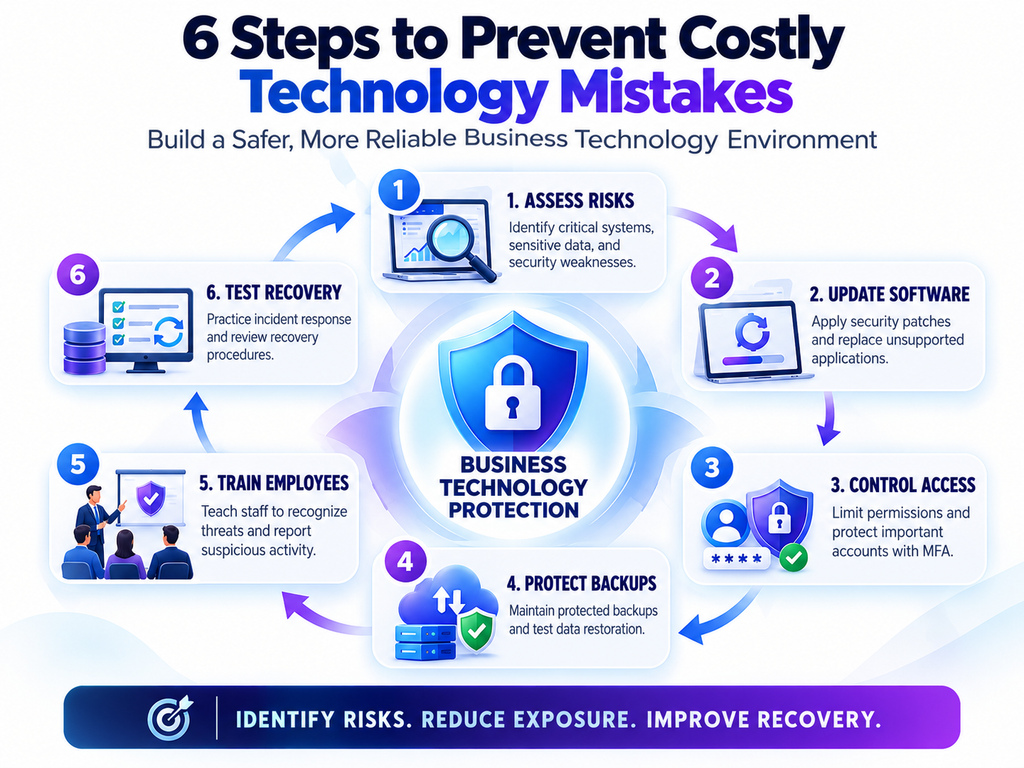
Step 1: Assess Your Current Technology Environment
Start by identifying the systems your business depends on.
Include devices, applications, cloud services, databases, networks, external providers, and sensitive information.
Determine which systems are essential for revenue generation, customer service, and daily operations.
This assessment provides a foundation for identifying weaknesses and prioritizing improvements.
Step 2: Identify and Rank the Biggest Risks
Not every issue deserves the same level of urgency.
A vulnerability affecting a critical customer-facing application may require immediate attention, while a minor issue in a nonessential internal tool may be addressed later.
Evaluate risks based on factors such as:
- Potential financial loss.
- Sensitivity of the information involved.
- Likelihood of exploitation or failure.
- Operational impact.
- Legal and contractual obligations.
- Availability of effective safeguards.
Document the most important risks and assign responsibility for addressing them.
Step 3: Prioritize High-Impact Security Improvements
Businesses should first address weaknesses that could cause severe damage.
Depending on the organization, these priorities may include enabling MFA, patching critical vulnerabilities, restricting administrative access, improving backups, or securing exposed systems.
Small improvements can significantly reduce risk when they address common and preventable weaknesses.
Step 4: Establish Clear Ownership
Every important system should have a responsible owner.
This person or team should understand the system’s business purpose, maintenance requirements, security responsibilities, and recovery procedures.
Clear ownership prevents essential tasks from being overlooked and makes accountability easier to establish.
Step 5: Review Performance and Security Regularly
Technology risks change as businesses grow, employees change roles, and software evolves.
Organizations should periodically review their security controls, software inventory, backup reliability, access permissions, and vendor relationships.
They should also track useful indicators, such as patch compliance, backup restoration success, incident response time, and the number of unsupported systems.
Regular reviews help businesses identify emerging problems before they become expensive emergencies.
Step 6: Invest in Prevention and Preparedness
Preventive controls can reduce the likelihood of an incident, while recovery plans help limit the consequences when something goes wrong.
Businesses need both.
A balanced approach combines security awareness, reliable infrastructure, sensible access controls, tested backups, incident response procedures, and ongoing maintenance.
Organizations that establish these practices are better positioned to manage technology risks without allowing them to undermine business performance.
Conclusion
The technology mistakes that cost businesses millions rarely begin as major disasters. They often start with small decisions: postponing a software update, choosing a solution without evaluating its long-term costs, neglecting backups, overlooking employee training, or granting unnecessary access to sensitive information.
Over time, these decisions can create vulnerabilities, increase operational expenses, interrupt business activities, and weaken customer trust.
The solution is not to avoid technology or spend unlimited money on security. Instead, businesses need a clear understanding of their risks, a realistic technology strategy, and consistent processes for maintaining the systems they depend on.
Start by reviewing your current infrastructure, identifying your most important vulnerabilities, and addressing the risks that could cause the greatest damage. Make sure your backups work, your software receives appropriate updates, and your employees understand how to handle suspicious activity.
Just as importantly, treat technology as an ongoing business responsibility rather than a one-time investment.
Preventing every possible incident is unrealistic. However, organizations can reduce their exposure, improve their recovery capabilities, and make better financial decisions by taking a proactive approach.
The technology mistakes that cost businesses millions are often preventable when companies recognize the warning signs early and take action. By prioritizing security, reliability, and informed decision-making, businesses can protect their operations today while building a stronger foundation for future growth.
For more practical insights into cybersecurity, digital risks, and technology protection, explore the Botdef website and make informed security decisions part of your business strategy.