In today’s digital world, staying secure isn’t just an option—it’s a necessity. This blog is your go-to source for the latest security updates and insights.
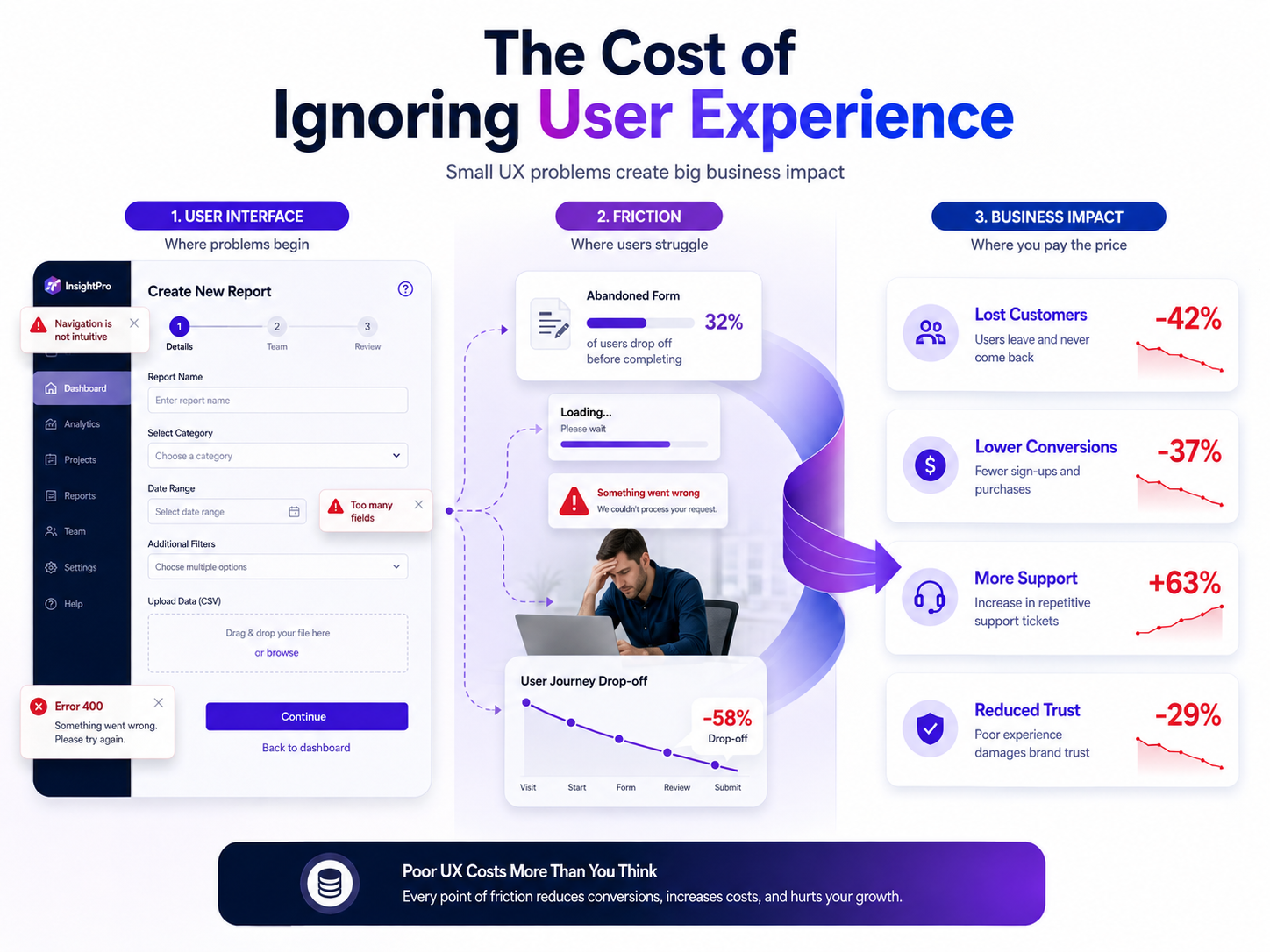
A website or application can have strong security, powerful features, and modern technology behind it. However, if users struggle to understand it, navigate it, or complete basic tasks, those technical strengths may not translate into business value. This is where the cost of ignoring user experience becomes clear.
User experience, commonly called UX, affects how people interact with a website, application, dashboard, or digital service. Every click, form, error message, loading screen, and navigation decision contributes to the overall experience.
Poor UX rarely causes only one problem. It can increase abandonment, reduce conversions, create support requests, damage trust, and even introduce security risks. For businesses operating online, ignoring UX can therefore become much more expensive than investing in it.
A useful starting point is understanding how security and usability work together. A secure digital product should also make secure behavior understandable and practical for users. Resources such as Botdef’s security-focused platform can help readers explore security from a broader perspective while considering how digital experiences affect trust.
What Does User Experience Really Mean?
User experience is more than visual design.
A beautiful interface does not automatically provide a good user experience. UX covers the complete journey a person has with a digital product, from the first interaction to the final task.
For example, consider an online business dashboard. Users may need to:
- Sign in securely
- Find the correct section
- Understand available options
- Complete a task
- Receive confirmation
- Recover from an error
- Find help when something goes wrong
If any of these steps are unnecessarily complicated, users experience friction.
Good UX makes important actions easier to understand and complete. It provides clear navigation, readable content, predictable interactions, helpful feedback, and accessible design.
Most importantly, good UX respects the user’s time.
The Cost of Ignoring User Experience Is Bigger Than It Looks
Lost Customers and Abandoned Actions
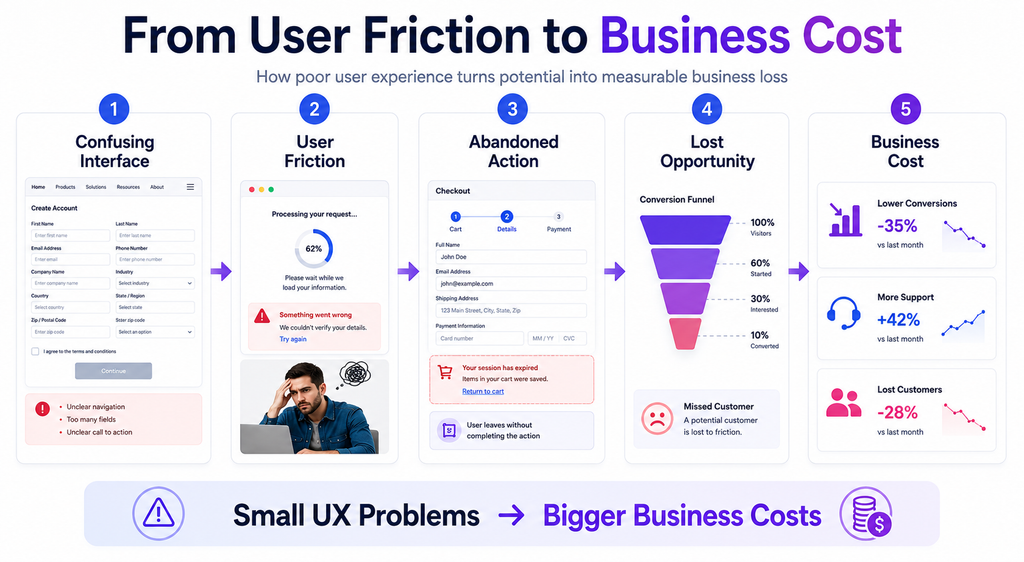
One of the most visible consequences of poor UX is abandonment.
Imagine a customer visits a website because they are interested in a service. They find the product they need, click the call-to-action button, and arrive at a complicated form containing unnecessary fields.
Instead of completing the form, they leave.
From a business perspective, the problem may appear to be a lack of customer interest. In reality, the customer may have been interested but unwilling to fight through the interface.
This is one of the most important aspects of the cost of ignoring user experience: businesses often lose potential customers without receiving a clear explanation of why they left.
Small points of friction can accumulate quickly:
- Confusing navigation
- Slow-loading pages
- Unclear buttons
- Complicated forms
- Unexpected pop-ups
- Poor mobile layouts
- Technical errors
- Difficult account recovery
- Unclear pricing or instructions
Each problem may appear minor individually. Together, they can create an experience that users simply do not want to continue.
Lower Conversion Rates
UX has a direct relationship with conversion.
Whether the goal is completing a purchase, requesting a demo, creating an account, downloading a resource, or contacting a business, users must understand what to do next.
A strong conversion experience usually answers three questions quickly:
- What is this?
- Why should I care?
- What should I do next?
When a page fails to answer these questions, users have to think harder.
That extra cognitive effort creates friction.
For example, changing a button label from a vague phrase such as “Continue” to a specific action such as “Create Account” can make the next step clearer. Similarly, explaining why information is required can reduce hesitation during form completion.
UX optimization is therefore not simply about making a website look better. It is about removing unnecessary obstacles between users and their goals.
Poor UX Can Damage Brand Trust
Trust is difficult to build and easy to lose.
Users often judge a business based on the quality of its digital experience. A website that contains broken links, inconsistent layouts, confusing messages, or outdated interfaces may make visitors question the reliability of the organization behind it.
This becomes especially important for security-related products and services.
A user may reasonably ask:
“If this website cannot protect me from a confusing experience, can I trust it with my sensitive information?”
That perception can influence whether users create an account, share information, purchase a service, or recommend the product.
According to usability principles discussed by the Nielsen Norman Group, users benefit from systems that provide visibility of system status, consistency, error prevention, and clear recovery options.
These principles remain valuable because users do not separate design quality from product quality as neatly as development teams sometimes do.
The Hidden Cost of Support Requests
Poor UX can also increase operational costs.
Suppose users repeatedly contact support because they cannot:
- Reset a password
- Find an account setting
- Understand an error
- Complete a form
- Configure a feature
- Locate important information
Every unnecessary support request consumes employee time.
One confusing workflow might generate dozens or thousands of repetitive questions over time. Support teams then spend their time explaining functionality that should have been obvious from the interface.
This creates a chain reaction:
Poor UX → User confusion → More support requests → Higher operational cost
Improving UX can break that chain.
A clear error message, for example, can eliminate an entire support conversation. Instead of showing:
“Error 400”
a better message might explain what happened and what the user should do next.
That small improvement can save time for both the customer and the support team.
Security and UX Are Closely Connected
UX is particularly important when security is involved.
Security controls are necessary, but they can become ineffective when users do not understand them.
Consider common security features such as:
- Multi-factor authentication
- Password requirements
- Login alerts
- Session management
- Account recovery
- Permission settings
- Security notifications
If these features are difficult to understand, users may attempt to bypass them, ignore warnings, reuse passwords, or make unsafe decisions.
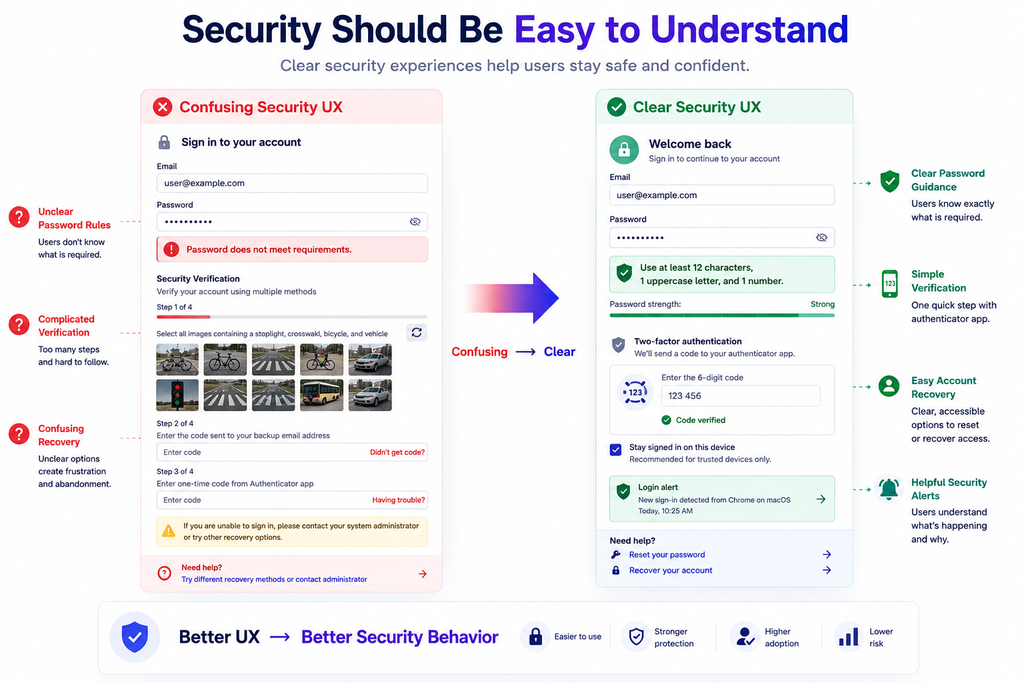
Security UX should therefore focus on making secure behavior easy to understand.
For example, instead of simply displaying:
“Password does not meet requirements.”
a helpful interface can explain:
“Use at least 12 characters, including one uppercase letter and one number.”
The second message provides actionable information.
This is where UX becomes part of security rather than something that exists separately from it.
For additional security awareness and practical technology insights, readers can also explore the Botdef blog for related educational resources.
The Cost of Ignoring User Experience on Mobile
Mobile users introduce another layer of complexity.
A website that works well on a desktop may become frustrating on a smartphone. Small buttons, horizontal scrolling, tiny text, crowded forms, and slow-loading resources can quickly create problems.
Mobile UX matters because users increasingly interact with digital services across different screen sizes and environments.
A mobile user might be:
- Using one hand
- Operating on a slow connection
- Reading outdoors
- Switching between applications
- Using a smaller screen
- Completing a task while distracted
Design decisions should account for these real-world conditions.
Responsive design is therefore not simply about making content fit different screen sizes. It is about making the experience usable in different contexts.
Accessibility Is Part of Good UX
Ignoring accessibility can exclude a significant portion of your potential audience.
Users may interact with digital products using:
- Screen readers
- Keyboard navigation
- Voice controls
- Magnification tools
- Alternative input devices
Accessible design benefits these users while often improving usability for everyone else.
For example, clear headings help screen-reader users navigate a page, but they also help sighted users scan content faster.
Descriptive labels improve accessibility while making forms easier for everyone.
The W3C Web Accessibility Initiative provides widely recognized guidance on digital accessibility and explains why accessible experiences matter.
Accessibility should therefore be considered during product design rather than treated as an afterthought.
How Poor UX Affects Employee Productivity
UX problems do not only affect customers.
Employees also interact with internal dashboards, administration systems, CRM platforms, security tools, communication systems, and reporting software.
When internal tools are difficult to use, employees spend additional time searching, correcting mistakes, and asking colleagues for help.
For example, imagine an employee needs to locate a security event but must navigate through six confusing screens to find it.
That workflow may take only a few extra minutes.
However, multiplied across hundreds of employees and repeated throughout the year, those minutes become a meaningful business cost.
Good UX can improve productivity by helping employees complete routine tasks faster and with fewer mistakes.
The Relationship Between UX and Error Rates
Poor interfaces can increase human error.
When users are presented with unclear choices, inconsistent controls, or insufficient feedback, mistakes become more likely.
Consider a destructive action such as deleting an account or removing an important configuration.
A poorly designed interface might place a small “Delete” button next to other common actions with no confirmation.
A better UX might:
- Clearly identify the action.
- Explain its consequences.
- Ask for confirmation.
- Require an additional verification step when appropriate.
- Provide recovery options when possible.
This approach reduces accidental actions without creating unnecessary friction.
Good UX does not mean removing every security or confirmation step. Instead, it means designing those steps intelligently.
How to Measure the Cost of Ignoring User Experience
UX improvements should be measurable.
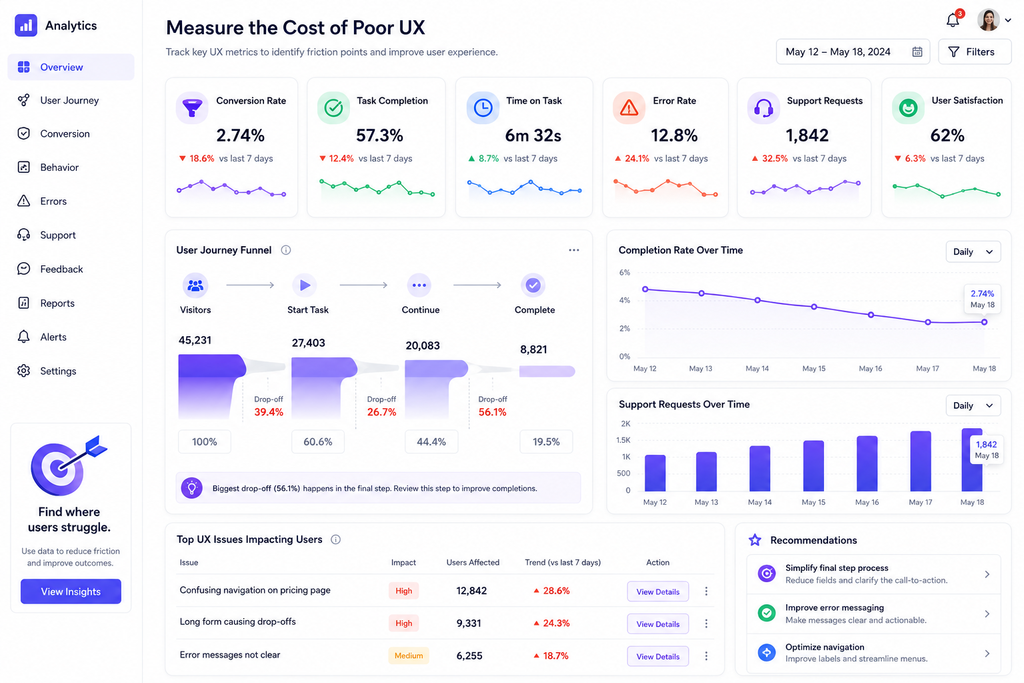
Businesses can monitor several indicators to identify experience problems.
Conversion Rate
Measure how many visitors successfully complete an intended action.
A declining conversion rate may indicate a problem with messaging, navigation, forms, performance, or trust.
Task Completion Rate
Choose important user tasks and measure how many users complete them successfully.
Examples include:
- Creating an account
- Resetting a password
- Completing checkout
- Finding a setting
- Submitting a support request
Time on Task
Measure how long users need to complete important workflows.
A shorter completion time is not always better, but unexpectedly long workflows can reveal unnecessary friction.
Error Rate
Track how often users encounter validation errors, failed actions, broken links, or unsuccessful workflows.
High error rates often identify areas that deserve usability testing.
Support Volume
Look for repeated support questions.
If users continuously ask the same question, the problem may not be the users. The interface may need improvement.
User Feedback
Surveys, interviews, usability tests, and feedback forms can reveal problems that analytics alone cannot explain.
Numbers tell you what is happening. User research often helps explain why.
Practical Ways to Reduce the Cost of Ignoring User Experience
Improving UX does not always require rebuilding an entire product.
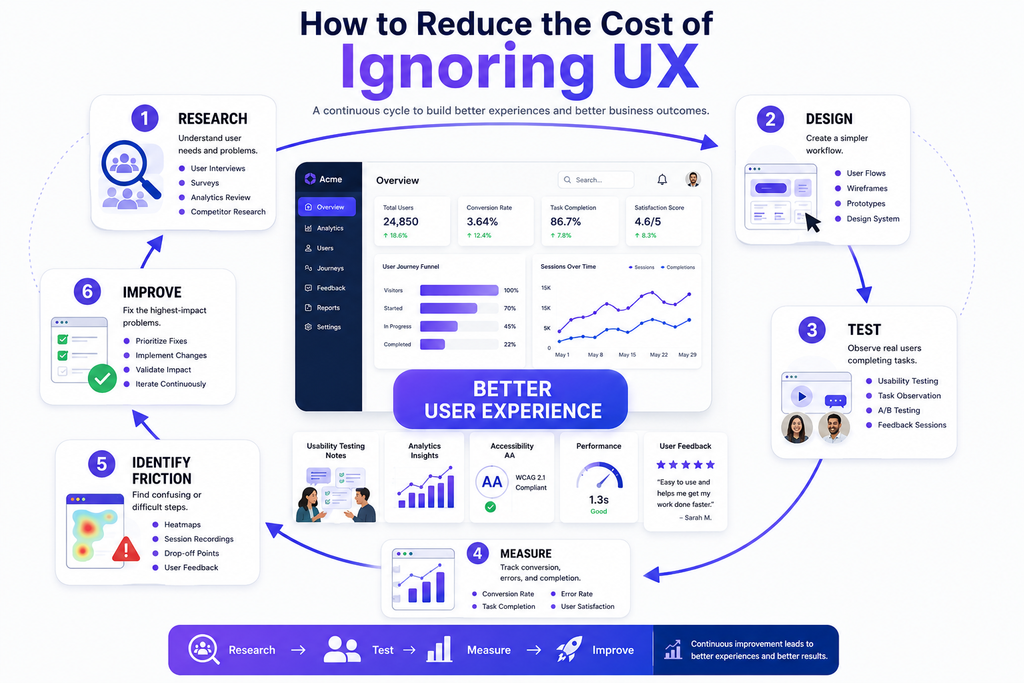
Start with the areas that create the most friction.
1. Identify Critical User Journeys
Map the most important workflows.
For example:
Landing page → Registration → Verification → Login → Dashboard → Primary action
Test every step.
Ask whether users understand what to do without additional explanation.
2. Simplify Navigation
Users should not need to memorize where features are located.
Use clear labels and logical categories. Keep navigation consistent throughout the product.
3. Improve Error Messages
Every error should help users recover.
A useful error message should explain:
- What happened
- Why it happened, when appropriate
- What the user can do next
4. Reduce Unnecessary Form Fields
Only request information that is genuinely required.
Long forms increase effort and can reduce completion rates.
5. Improve Loading Performance
Performance is part of UX.
Users expect pages and applications to respond quickly. Optimize images, scripts, API calls, caching, and other performance bottlenecks.
Google’s Core Web Vitals documentation provides useful guidance for understanding important aspects of web performance and user experience.
6. Test With Real Users
Internal teams become familiar with their own products.
As a result, developers and designers may overlook problems that are obvious to new users.
Usability testing with real users can uncover unexpected friction quickly.
7. Prioritize High-Impact Problems
Do not attempt to redesign everything simultaneously.
Prioritize issues based on:
Impact × Frequency × Business Importance
A confusing checkout process affecting thousands of users should usually receive more attention than a minor visual inconsistency on an infrequently visited page.
A Simple UX Audit Checklist
Teams can perform a basic UX review using the following checklist:
- Is the main purpose of each page immediately clear?
- Can users find important features quickly?
- Are buttons labeled with clear actions?
- Are forms simple and understandable?
- Are error messages actionable?
- Does the product work well on mobile devices?
- Are important security controls easy to understand?
- Can users recover from mistakes?
- Are pages accessible to users with different needs?
- Are important workflows measured?
- Are repeated support issues being investigated?
- Are broken links and technical errors monitored?
- Is the interface consistent across the product?
This checklist is not a replacement for professional usability research, but it can help teams identify obvious problems before they become expensive.
UX Should Be Treated as a Business Investment
One of the biggest mistakes organizations make is treating UX as a cosmetic expense.
A redesigned button, improved navigation structure, clearer error message, or simplified workflow may appear small. However, these improvements can affect conversion, retention, support costs, productivity, trust, and security behavior.
That makes UX a business investment rather than merely a design activity.
The important question is not:
“How much will improving UX cost?”
It is also:
“How much is our current experience already costing us?”
That second question changes the conversation.
Instead of viewing UX work as an optional improvement, businesses can evaluate it based on measurable outcomes.
Building a Better UX Culture
Long-term UX improvement requires more than a single redesign.
Teams should build UX into the product development process.
A practical approach includes:
- Research user needs.
- Define important user journeys.
- Design simple workflows.
- Test prototypes.
- Measure real usage.
- Identify friction points.
- Improve the experience.
- Repeat the process.
Developers, designers, product managers, security teams, and business stakeholders should work together.
Security teams can explain necessary controls. Developers can identify technical limitations. Designers can simplify interactions. Product teams can prioritize improvements based on business value.
When these perspectives come together, organizations can create experiences that are both secure and usable.
Final Thoughts: The Real Cost of Ignoring User Experience
The cost of ignoring user experience extends far beyond an unattractive interface.
Poor UX can lead to lost customers, lower conversions, increased support costs, employee inefficiency, higher error rates, accessibility problems, security mistakes, and reduced trust.
On the other hand, thoughtful UX can make digital products easier to understand, safer to use, faster to navigate, and more valuable to both businesses and their customers.
The best approach is not to choose between security, functionality, and usability. A strong digital product should bring all three together.
Businesses that continuously test workflows, listen to users, monitor performance, improve accessibility, and simplify security controls are better positioned to create lasting digital experiences.
Ultimately, the cost of ignoring user experience is not just measured in design problems. It is measured in the customers who leave, the employees who lose time, the support requests that could have been avoided, and the trust that becomes difficult to rebuild.
Good UX is therefore not an optional layer added after development. It is a fundamental part of building reliable, secure, and successful digital products.