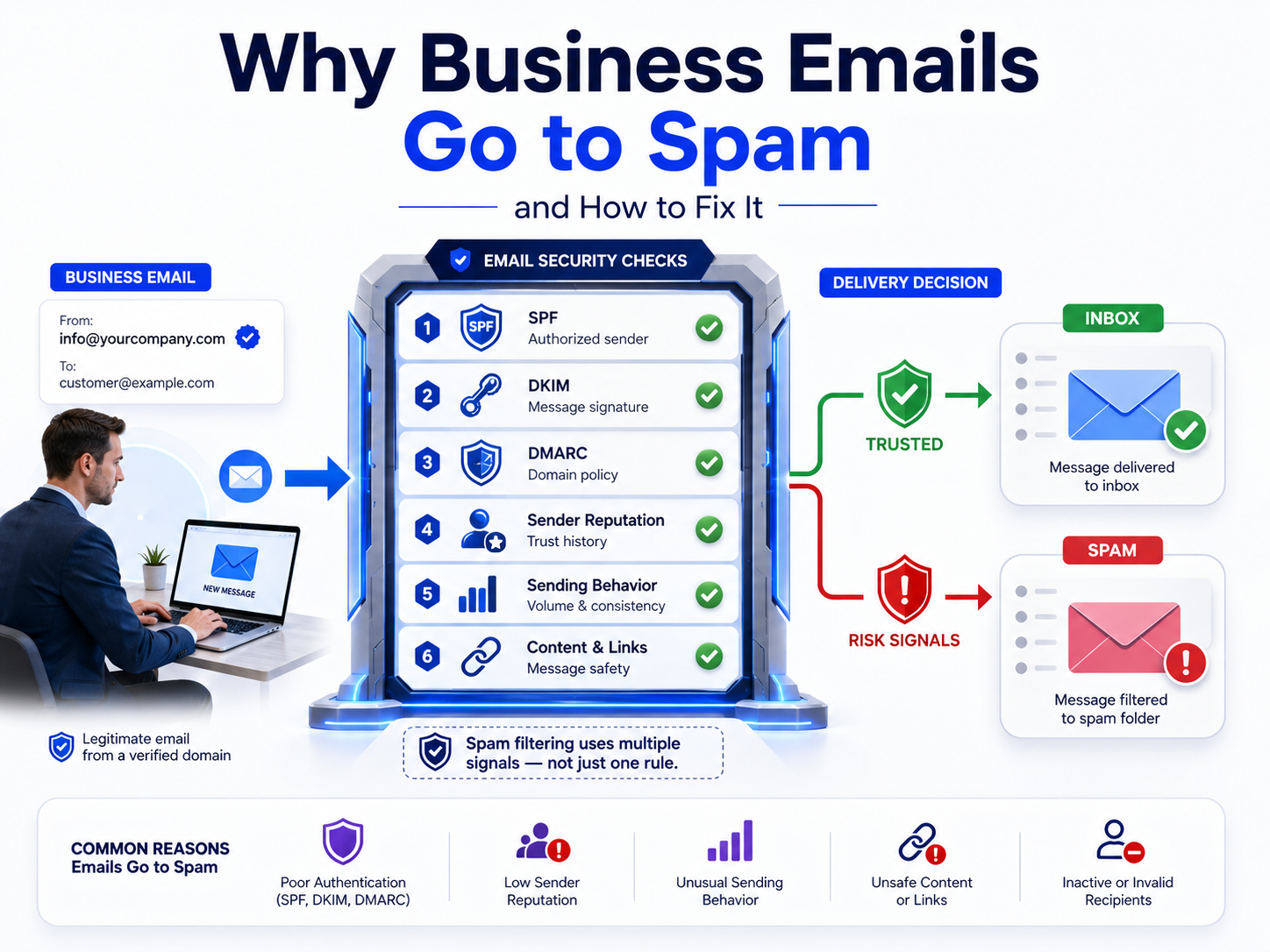
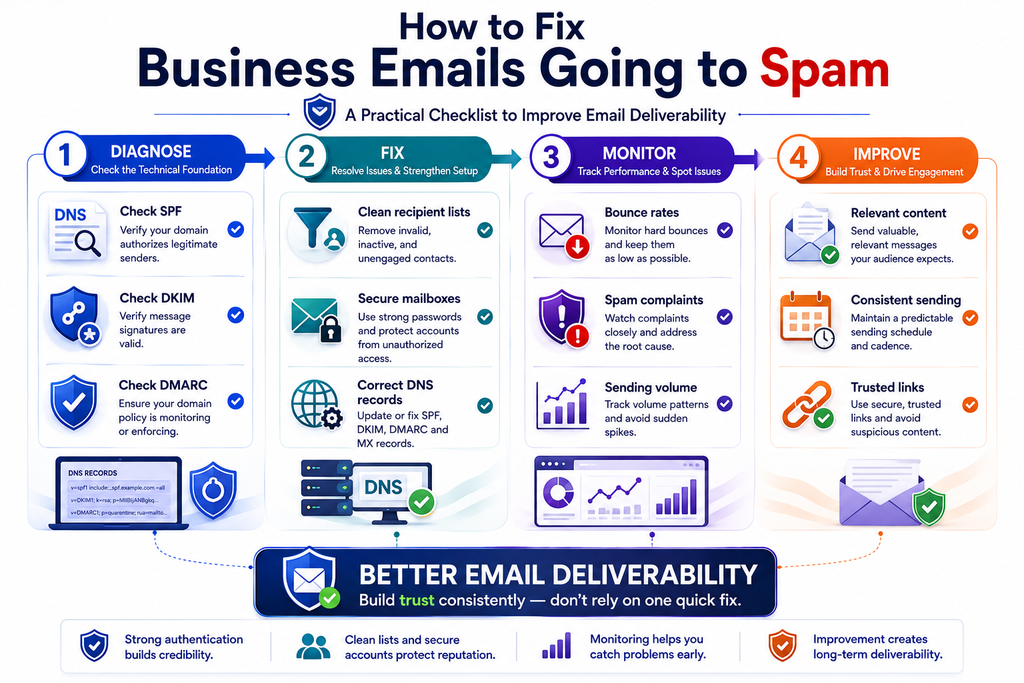
Business emails go to spam for many reasons, including poor sender reputation, missing email authentication, suspicious sending behavior, weak content signals, and incorrect DNS configuration. The good news is that most email deliverability problems can be identified and fixed with the right checks.
For businesses, email is still one of the most important channels for customer communication. A company may use email for inquiries, invoices, account notifications, sales conversations, support, onboarding, and important business updates. But when legitimate messages consistently land in spam, the problem is bigger than an inconvenient inbox placement issue. It can affect customer trust, response rates, revenue, and the perceived professionalism of the business.
Email providers such as Gmail, Outlook, and Yahoo evaluate multiple signals before deciding whether a message belongs in the inbox. These signals can include sender reputation, authentication records, recipient engagement, sending patterns, message content, domain history, and whether the sender appears trustworthy.
This guide explains why business emails go to spam, how to diagnose the problem, and what practical steps businesses can take to improve email deliverability.
Why Do Business Emails Go to Spam?
The most common causes of business emails going to spam are:
- Missing or incorrect SPF, DKIM, or DMARC records
- Poor domain or IP reputation
- Sending too many emails too quickly
- High bounce rates
- Sending to inactive or invalid addresses
- Recipients repeatedly marking emails as spam
- Suspicious links or attachments
- Misleading subject lines
- Poorly configured DNS records
- Shared IP reputation problems
- Compromised email accounts
- Inconsistent sending behavior
- Lack of proper email infrastructure
There is rarely one universal reason. Email providers use several signals together, so fixing only one problem may not immediately solve the issue.
1. Your Domain Has Poor Sender Reputation
Sender reputation is one of the most important factors affecting email deliverability.
Think of your sending domain like a business identity. If a domain consistently sends useful emails to engaged recipients, providers have more reason to trust it. If the same domain generates complaints, hard bounces, suspicious activity, or unusual sending patterns, its reputation can deteriorate.
How reputation gets damaged
A domain may develop a poor reputation when:
- Many recipients report messages as spam
- Emails are sent to purchased or outdated lists
- Bounce rates are high
- A compromised account sends unwanted messages
- The domain suddenly increases its sending volume
- Recipients rarely open or interact with messages
- Multiple users send questionable content from the same domain
How to fix it
Start by reviewing your sending history.
Identify:
- Which domains and mailboxes are sending messages?
- How many emails are being sent?
- What percentage of emails bounce?
- Are recipients reporting messages as spam?
- Are there unusual login or sending patterns?
- Are multiple employees sending from the same domain?
If a mailbox has been compromised, secure the account immediately by changing the password, enabling strong authentication where available, reviewing account access, and removing unauthorized sessions or applications.
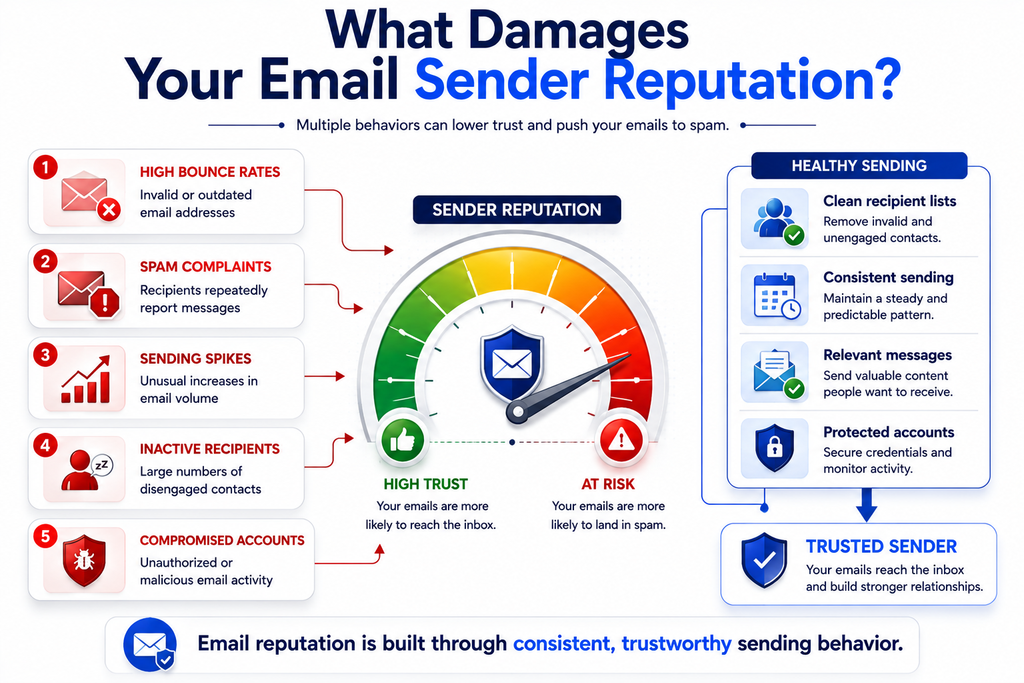
Improving reputation is usually a gradual process. Consistent, legitimate sending behavior is more valuable than attempting to send large volumes immediately.
2. SPF Is Missing or Incorrect
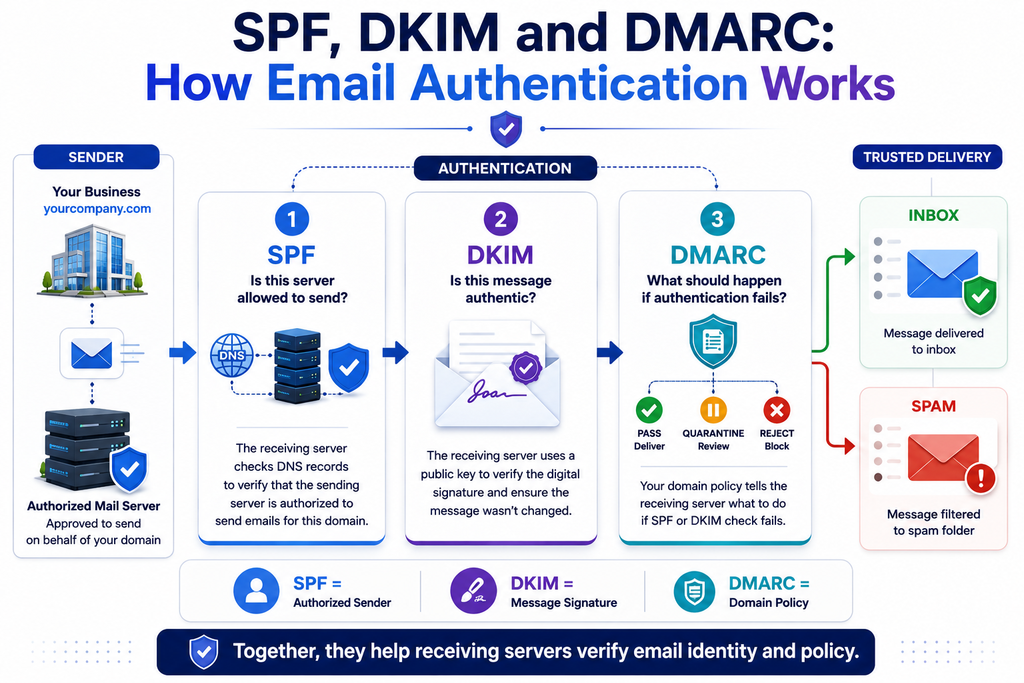
SPF (Sender Policy Framework) allows a domain owner to specify which mail servers are authorized to send email on behalf of the domain.
For example, if your company uses a particular email service, that service may need to be included in your domain’s SPF record.
A typical SPF record looks conceptually like:
v=spf1 include:example-email-provider.com ~all
The exact value depends on the services your organization uses.
Why SPF matters
If a receiving server cannot verify that the sending infrastructure is authorized, the message may receive a weaker trust signal.
However, SPF is not a complete solution by itself. Modern email authentication typically involves SPF, DKIM, and DMARC working together.
How to fix SPF
Check your domain’s DNS configuration and confirm:
- An SPF record exists
- There is only one SPF TXT record for the domain
- All legitimate sending services are authorized
- Old email providers are removed when no longer used
- The SPF record does not exceed DNS lookup limitations
Do not simply copy an SPF record from another company. Your record should reflect your actual email infrastructure.
3. DKIM Is Not Configured Correctly
DKIM (DomainKeys Identified Mail) adds a cryptographic signature to outgoing emails.
The receiving mail server can use the public key published in DNS to verify that the message was signed by an authorized system and that important parts of the message were not modified after signing.
This helps establish that the email genuinely came through infrastructure authorized by the domain.
Common DKIM problems
Business emails can encounter authentication problems when:
- DKIM has never been enabled
- The DNS public key is incorrect
- The wrong selector is being used
- DNS changes have not propagated
- The sending platform is signing with an unexpected domain
- DKIM configuration was broken during an email-provider migration
How to fix DKIM
Generate or obtain the DKIM record from your email provider, publish the required DNS record, and then verify that outgoing messages contain a valid DKIM signature.
If your business recently changed email providers, review DKIM configuration carefully. DNS records from the previous provider may remain while the new provider requires different selectors.
4. DMARC Is Missing or Misconfigured
DMARC (Domain-based Message Authentication, Reporting, and Conformance) helps domain owners define how receiving servers should handle messages that fail authentication checks.
It also provides reporting capabilities that can help businesses understand who is sending email using their domain.
A basic DMARC policy might start with monitoring rather than immediately rejecting every authentication failure.
For businesses, this can be especially useful because it provides visibility into legitimate and unauthorized sending sources.
A practical DMARC approach
A common implementation strategy is:
Monitor → Analyze → Correct → Enforce
First, monitor authentication results. Then identify legitimate services that are failing SPF or DKIM alignment. Correct those configurations before gradually moving toward a stronger enforcement policy.
For official guidance on email authentication and sender requirements, see Google’s email sender guidelines.
5. Your Business Is Sending Too Many Emails Too Quickly
Sudden increases in sending volume can look suspicious.
Imagine a domain that normally sends 100 business emails per day and suddenly sends 50,000 messages within a few hours. Even if the messages are legitimate, the unusual behavior may attract additional scrutiny.
This is particularly important for businesses that are:
- Launching a new campaign
- Migrating email providers
- Starting customer notifications
- Sending newsletters
- Expanding their sales operation
- Adding a large number of new mailboxes
How to fix sending-volume problems
Build a predictable sending pattern.
Instead of making dramatic changes overnight:
- Increase volume gradually
- Maintain consistent sending behavior
- Remove inactive recipients
- Monitor bounce and complaint rates
- Separate transactional and marketing traffic where appropriate
- Investigate unusual sending spikes
The objective isn’t simply to send fewer emails. It is to establish predictable and legitimate sending behavior.
6. High Bounce Rates Hurt Deliverability
A bounce occurs when an email cannot be delivered.
Some bounces are temporary, such as a full mailbox or temporary server issue. Others are permanent, such as an invalid recipient address.
A consistently high number of hard bounces can indicate that a business is sending to an outdated or poorly maintained list.
Example
Suppose an online company has 20,000 customer email addresses. Over several years, some customers changed addresses, abandoned accounts, or entered incorrect information.
If the company continues sending campaigns to all 20,000 addresses without cleaning the list, a growing number of messages may bounce.
Fix
Regularly clean your recipient lists.
Remove or suppress:
- Invalid addresses
- Repeated hard bounces
- Clearly abandoned addresses
- Recipients who have unsubscribed
- Addresses that repeatedly fail delivery
List quality is an important part of long-term email deliverability.
7. Recipients Are Marking Your Emails as Spam
Sometimes the technical configuration is correct, but recipients simply don’t want the messages.
When users repeatedly mark emails as spam, it can become a serious reputation signal.
This often happens when businesses:
- Send messages users did not expect
- Hide unsubscribe options
- Send too frequently
- Use misleading subject lines
- Continue emailing people after they stop engaging
- Send irrelevant promotional content
How to fix it
Set clear expectations.
When someone provides an email address, make it clear what they are signing up for.
For example:
“You’ll receive one product update each month.”
is more transparent than collecting an email address and suddenly sending several promotional emails every week.
Relevance and permission are important parts of sustainable email communication.
8. Suspicious Links and Attachments Can Trigger Spam Filters
Email security systems inspect links, attachments, domains, and other characteristics of a message.
A legitimate business email can still look suspicious if it contains:
- Unexpected executable files
- Password-protected archives
- Obfuscated URLs
- Suspicious redirects
- Newly created domains
- Links to compromised websites
- Excessive tracking redirects
Cybercriminals frequently use email to distribute phishing pages and malware, so providers have strong incentives to identify suspicious patterns.
What businesses should do
Use links that clearly correspond to your legitimate business domains.
Before sending campaigns, verify that:
- Links work correctly
- Destination domains are trustworthy
- HTTPS is enabled
- Redirect chains are minimized
- Attachments are genuinely necessary
- Files are scanned for malware
Website and email security are closely connected. A compromised website or domain can damage trust far beyond the website itself.
9. Your Email Content Looks Spammy
Email filters don’t rely exclusively on individual words. Modern filtering systems evaluate broader patterns and context.
Still, businesses should avoid content that looks deceptive or excessively promotional.
Examples include:
- Excessive capitalization
- Misleading urgency
- Fake warnings
- Excessive exclamation marks
- Deceptive sender names
- Subject lines that don’t match the email
- Suspicious formatting
- Excessive use of promotional language
For example:
“URGENT!!! YOU HAVE WON $10,000 — CLAIM NOW!!!”
is obviously suspicious.
A professional business email would communicate the purpose clearly:
“Your account credit is ready to review”
The second approach is clearer, more trustworthy, and more aligned with a legitimate business communication.
10. Your DNS Configuration Is Incorrect
Email depends heavily on DNS.
If DNS records are incomplete or incorrectly configured, messages may fail authentication or delivery checks.
Businesses commonly need to review records associated with:
- MX
- SPF
- DKIM
- DMARC
- PTR/reverse DNS, where applicable
This becomes particularly important when setting up business email hosting.
For organizations managing their own email infrastructure or domain-based mailboxes, a properly configured hosting environment can simplify administration. Solutions such as BulkMX can be relevant when evaluating business email hosting infrastructure.
Before changing DNS records, document your current configuration. An incorrect DNS change can affect both incoming and outgoing email.
11. Shared IP Reputation Can Affect You
Some email providers use shared infrastructure where multiple customers send email through the same IP address.
This can create a reputation challenge.
Your business may follow good email practices while another sender using the same infrastructure behaves poorly.
That does not mean shared infrastructure is always bad. It simply means businesses should understand how their email provider manages reputation and abuse.
Questions to ask your email provider
- Is the sending IP shared or dedicated?
- How is abuse monitored?
- What happens when another customer causes reputation problems?
- Are authentication standards supported?
- Are delivery failures monitored?
- Can sending reputation be investigated?
Understanding your infrastructure is particularly important for organizations that depend heavily on email communication.
12. Your Website or Domain Has Security Problems
Email trust does not exist in isolation.
If your company website has been compromised, redirects visitors to suspicious destinations, displays security warnings, or contains malicious content, it can affect the overall trust associated with your digital presence.
A phishing campaign may also imitate your domain, making customers more cautious about legitimate emails from your company.
Businesses should therefore treat email security and website security as connected parts of a broader cybersecurity strategy.
Regularly review:
- SSL/TLS configuration
- Website vulnerabilities
- Domain registration security
- DNS changes
- Administrative accounts
- Website plugins and dependencies
- Suspicious redirects
- Unauthorized files
- Login activity
Security is not just about preventing attacks. It also protects the trust customers place in your digital identity.
How to Diagnose Business Emails Going to Spam
If business emails go to spam, don’t immediately change everything at once. Use a structured troubleshooting process.
Step 1: Test different recipient providers
Send legitimate test emails to accounts on services such as:
- Gmail
- Outlook
- Yahoo
- Another business domain
If messages reach one provider but consistently go to spam at another, the problem may involve provider-specific reputation or filtering signals.
Step 2: Check authentication
Verify:
- SPF
- DKIM
- DMARC
Make sure the records correspond to your actual sending infrastructure.
Step 3: Review bounce rates
Look for hard bounces and recurring delivery failures.
A sudden increase can indicate:
- Poor list quality
- DNS problems
- Reputation problems
- Infrastructure changes
- Recipient-server blocking
Step 4: Review recent changes
Ask what changed before the problem started.
For example:
- New email provider?
- New domain?
- New IP?
- New marketing campaign?
- Large increase in sending volume?
- DNS migration?
- New website?
- Security incident?
This can significantly narrow down the cause.
Step 5: Inspect message content
Check the sender name, subject, links, attachments, formatting, and overall purpose of the email.
Make sure the message looks like a normal communication from your company rather than something that could resemble phishing or unsolicited bulk email.
A Practical Email Deliverability Checklist
Use this checklist whenever your business emails start landing in spam:
Authentication
- SPF is configured
- DKIM is enabled
- DMARC is configured
- Authentication aligns with your sending domain
- Old email providers are removed from DNS where appropriate
Sending Practices
- Sending volume is predictable
- Sudden spikes are avoided
- Recipient lists are maintained
- Hard bounces are suppressed
- Unsubscribed users are not contacted again
Security
- Mailbox passwords are protected
- Suspicious login activity is investigated
- Website security is monitored
- DNS changes are controlled
- Links and attachments are checked
Content
- Subject lines accurately describe the email
- Sender identity is clear
- Links lead to legitimate destinations
- Promotional claims are not misleading
- Recipients understand why they received the message
What Businesses Should Prioritize First
If you don’t know where to start, focus on the highest-impact fundamentals.
First, secure your accounts and domain.
A compromised mailbox or domain can create serious deliverability problems very quickly.
Second, fix authentication.
SPF, DKIM, and DMARC provide the technical foundation for establishing domain identity.
Third, improve list quality.
Sending to invalid or disengaged addresses repeatedly is rarely beneficial.
Fourth, control sending behavior.
Avoid unexplained volume spikes and monitor delivery performance.
Fifth, improve message relevance.
Even perfectly authenticated email can perform poorly if recipients don’t want it.
These steps work together. Deliverability is not achieved through one DNS record, one software setting, or one email template.
Frequently Asked Questions
Why do my business emails go to spam but personal emails don’t?
Business domains may have different sending histories, authentication configurations, volumes, and reputations. A personal mailbox may send only a few messages per day, while a business domain could send hundreds or thousands.
The two situations therefore produce very different signals for receiving providers.
Does SPF alone prevent emails from going to spam?
No. SPF is important, but it is only one part of email authentication. DKIM, DMARC, sender reputation, recipient engagement, sending behavior, and message characteristics also matter.
How long does it take to fix email deliverability?
There is no universal timeline. Technical problems such as incorrect DNS records can sometimes be corrected relatively quickly. Reputation problems generally require consistent legitimate sending behavior over time.
Can changing email hosting fix spam problems?
It can help when the existing infrastructure has configuration or reputation problems, but changing providers is not automatically a solution.
If the underlying issue is poor list quality, spam complaints, compromised accounts, or misleading content, those problems can follow the business to the new infrastructure.
Is business email security connected to spam prevention?
Yes. Security incidents such as compromised mailboxes, phishing campaigns, malicious links, and unauthorized sending can damage trust and reputation. Strong account security and domain protection should therefore be part of a broader email deliverability strategy.
Conclusion
Business emails go to spam when receiving providers detect signals that reduce confidence in the sender. Common causes include weak email deliverability, missing SPF, DKIM or DMARC authentication, poor sender reputation, high bounce rates, excessive sending volume, spam complaints, suspicious links, poor list hygiene, and security problems.
The best solution is not to rely on a single trick. Start with the fundamentals: secure your domain and mailboxes, configure SPF/DKIM/DMARC correctly, maintain clean recipient lists, send consistently, monitor bounces and complaints, and make every message relevant to its recipient.
Businesses should also remember that email trust is part of a larger digital-security picture. Your domain, website, DNS configuration, mail infrastructure, and customer-facing communications all contribute to how trustworthy your organization appears online.
If your business emails go to spam, treat the problem as both a technical and operational issue. Diagnose the authentication and infrastructure first, then examine reputation, sending behavior, content, and security. A consistent approach can turn email from an unreliable communication channel into a dependable part of your business operations.