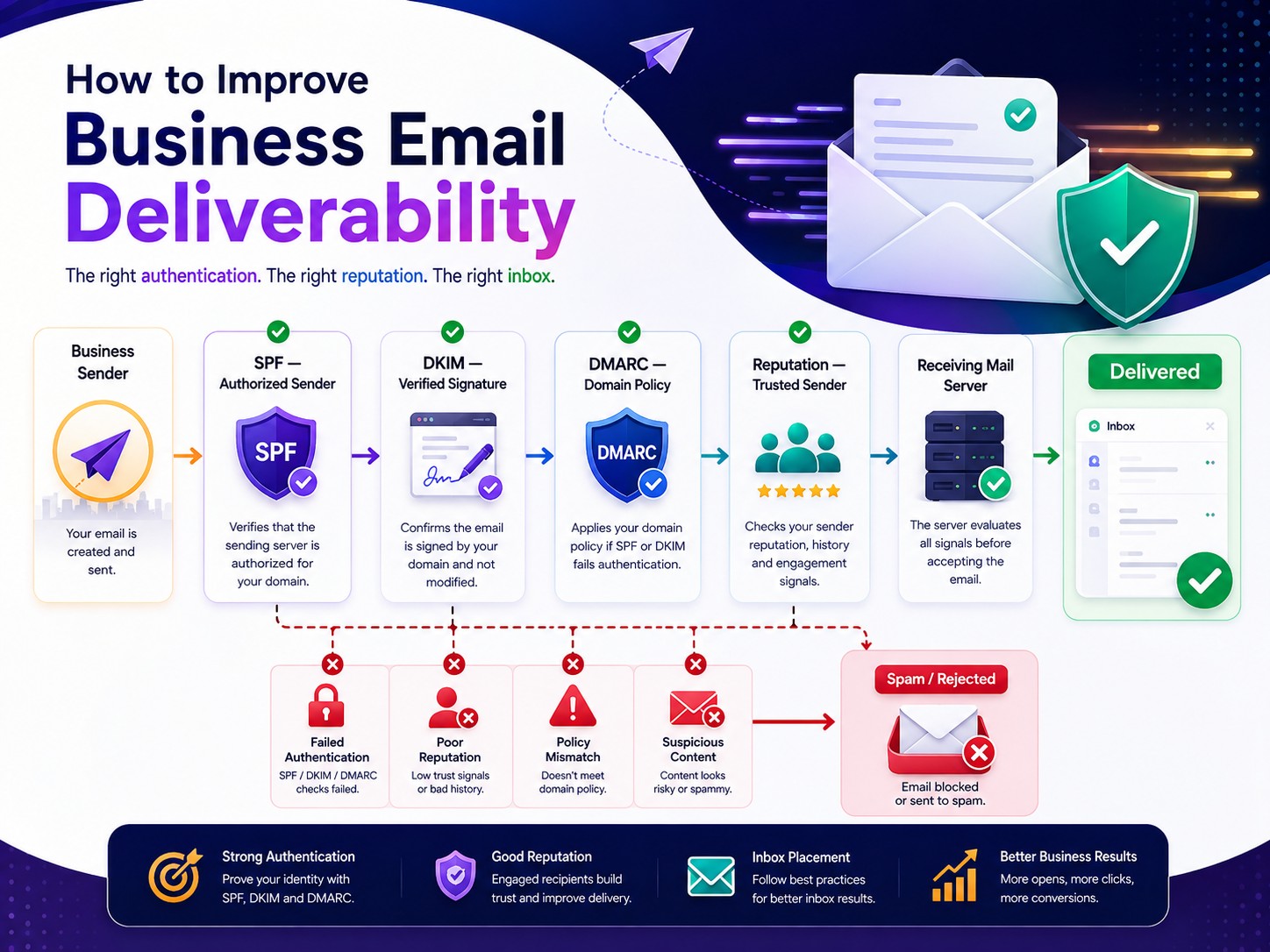
How to improve business email deliverability starts with one simple goal: make sure legitimate emails reach the recipient’s inbox instead of being rejected, delayed, or sent to spam. In other words, your email should reach the people who are expecting it.
For businesses, email is more than a communication channel. For example, companies use email for sales, customer service, account notifications, invoices, marketing, onboarding, and important business updates.
However, poor email deliverability is rarely caused by one issue. Instead, it can result from weak sender authentication, poor list quality, sudden sending-volume changes, misleading content, spam complaints, or technical DNS problems.
This guide explains how to improve business email deliverability, what commonly causes emails to land in spam, and the practical steps businesses can take to build a more reliable email-sending system.
What Is Email Deliverability?
Email deliverability refers to the ability of your emails to successfully reach recipients’ mailboxes.
It is different from simply sending an email.
For example, an email system may report that 10,000 messages were sent. That does not necessarily mean all 10,000 reached the inbox. Some may have been rejected by the receiving server, bounced, placed in spam, or filtered before reaching the recipient’s primary inbox.
A healthy email-delivery strategy therefore focuses on several stages:
Send → Authenticate → Deliver → Avoid Spam → Reach the Inbox → Generate Engagement
The receiving mail server evaluates many signals before deciding what to do with a message.
How to Improve Business Email Deliverability
The most effective way to improve business email deliverability is to treat email sending as a technical and reputation-management process rather than simply increasing sending volume.
Here are the most important areas to address.
1. Configure SPF, DKIM, and DMARC
Email authentication is one of the most important foundations of reliable business email delivery.
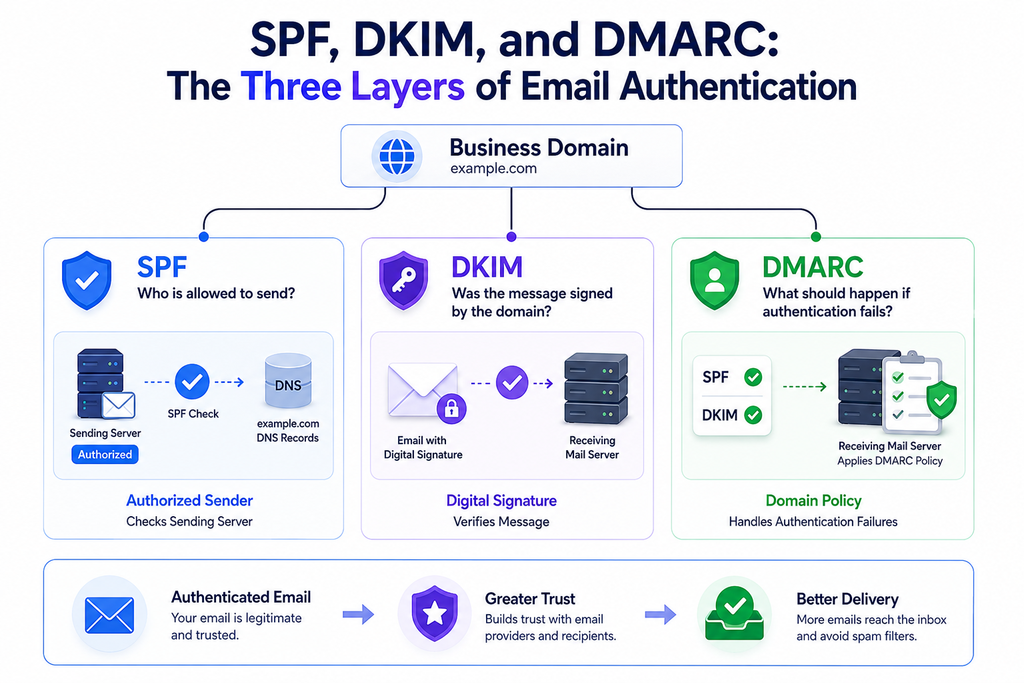
Three standards are particularly important:
- SPF (Sender Policy Framework): Identifies which servers are authorized to send email for your domain.
- DKIM (DomainKeys Identified Mail): Adds a cryptographic signature that allows receiving systems to verify that a message was authorized by the sending domain and was not improperly modified.
- DMARC (Domain-based Message Authentication, Reporting, and Conformance): Builds on SPF and DKIM and allows domain owners to publish instructions for handling messages that fail authentication.
Without properly configured authentication, legitimate business messages can face greater delivery problems and may be more vulnerable to spoofing.
Before sending significant email volume, check your domain’s DNS configuration and make sure the authentication records match your actual email infrastructure.
For businesses managing their own email infrastructure, products such as BulkMX can also be relevant when planning business email delivery and mailbox infrastructure.
2. Protect Your Sender Reputation
Your sending reputation influences how receiving mail systems treat your messages.
A domain or sending IP with a history of unwanted mail, high bounce rates, spam complaints, or suspicious sending behavior can experience delivery problems.
Important reputation signals include:
- Spam complaint rates
- Bounce rates
- Recipient engagement
- Sending consistency
- Domain reputation
- IP reputation
- Authentication results
- Quality of recipient lists
Think of sender reputation like a business reputation. A company that consistently sends useful, expected communication is more likely to be trusted than one that repeatedly sends irrelevant messages.
3. Send to People Who Expect Your Emails
One of the easiest ways to damage deliverability is to send emails to recipients who never asked to receive them.
A large list is not automatically a valuable list.
For example, imagine a company has 50,000 email addresses but regularly sends campaigns to inactive or unverified recipients. If a significant portion of those addresses bounce or recipients repeatedly ignore or report the messages, the apparent size of the list provides little benefit.
Instead:
- Collect addresses through legitimate signup methods.
- Explain what subscribers will receive.
- Remove invalid addresses.
- Give recipients an easy unsubscribe option.
- Regularly review inactive contacts.
- Avoid purchasing generic email lists.
A smaller, engaged audience can be much healthier for deliverability than a large, unresponsive database.
4. Keep Bounce Rates Under Control
A bounce occurs when an email cannot be delivered to its intended recipient.
There are two broad categories.
Hard Bounces
A hard bounce usually indicates a permanent delivery problem.
Examples include:
- Non-existent email addresses
- Invalid domains
- Permanently rejected recipients
These addresses should generally be removed from future sending.
Soft Bounces
A soft bounce is usually temporary.
Possible causes include:
- Full recipient mailbox
- Temporary server problem
- Message-size restrictions
- Temporary receiving-server rejection
Repeated soft bounces should still be investigated rather than ignored.
If a business continues sending to invalid recipients, its email infrastructure can accumulate unnecessary failures and negatively affect overall sending quality.
5. Avoid Sudden Changes in Sending Volume
Sending behavior matters.
Suppose a business normally sends 500 emails per day and suddenly sends 100,000 messages from the same infrastructure without preparation. That dramatic change can create unusual traffic patterns.
Instead, businesses introducing a new sending system or domain should establish volume gradually and maintain consistent sending behavior.
A practical approach is to:
- Start with legitimate, engaged recipients.
- Monitor delivery and bounce results.
- Increase volume gradually when performance remains healthy.
- Investigate unusual rejection patterns.
- Avoid unnecessary volume spikes.
The correct approach depends on the email provider, infrastructure, audience, and type of email being sent.
6. Write Emails That Look Legitimate
Email content can also influence filtering.
There is no single word or phrase that automatically makes an email spam. Modern filtering systems consider many signals together.
However, businesses should avoid patterns that make messages appear deceptive or low quality.
For example:
- Misleading subject lines
- Fake urgency
- Excessive punctuation
- Deceptive sender names
- Hidden links
- Suspicious attachments
- Poorly formatted HTML
- Excessive promotional language
- Content that does not match the recipient’s expectations
A better email clearly identifies who sent it, why the recipient is receiving it, and what action the recipient can take.
Example
Instead of:
URGENT!!! CLAIM YOUR LIMITED OFFER NOW!!!
A legitimate business email might use:
Your account renewal information
The second subject communicates the purpose clearly without attempting to manipulate the recipient.
7. Maintain a Healthy Domain and DNS Setup
Email delivery depends heavily on technical configuration.
Your sending domain should have a consistent and correctly configured DNS setup.
Depending on your infrastructure, this can involve:
- MX records
- SPF records
- DKIM records
- DMARC records
- Reverse DNS/PTR configuration
- Correct hostname configuration
DNS errors can cause authentication failures or create inconsistencies between the domain and the servers sending messages.
For organizations managing email infrastructure, technical configuration should be reviewed whenever servers, providers, domains, or sending architecture change.
8. Separate Transactional and Marketing Email
Not every business email has the same purpose.
Transactional messages might include:
- Password resets
- Order confirmations
- Account notifications
- Invoices
- Security alerts
- Registration confirmations
Marketing messages might include:
- Promotional campaigns
- Product announcements
- Newsletters
- Sales offers
Keeping different types of email logically separated can make monitoring easier and help organizations identify delivery problems more quickly.
For example, if a promotional campaign generates complaints, it should not make it difficult to determine whether critical account notifications are also being affected.
9. Make Your Website and Email Identity Consistent
Email trust does not exist independently from your website.
When a customer receives an email from a company, they may visit its website before deciding whether to trust the message.
Make sure:
- The sending domain matches the company’s identity.
- Links lead to legitimate company-controlled destinations.
- Branding is consistent.
- Contact information is easy to find.
- HTTPS is enabled.
- Security warnings are avoided.
- The website does not contain obvious technical errors.
This is especially important for businesses handling customer information, payments, account access, or other sensitive data.
A secure digital experience helps reinforce the trust established by legitimate email communication.
10. Monitor Email Authentication and Delivery Results
Improving deliverability is not a one-time configuration task.
Businesses should regularly monitor:
- Delivery rates
- Bounce rates
- Spam complaints
- Authentication failures
- Rejection messages
- Engagement trends
- Domain reputation
- IP reputation
If delivery suddenly drops, investigate the change instead of simply increasing sending volume.
For example:
Normal week:
95%+ successful delivery with low bounce rates.
Sudden change:
Large increase in bounces and receiving-server rejections.
That pattern should trigger an investigation into recent DNS changes, sending-volume changes, recipient-list quality, infrastructure changes, or reputation problems.
11. Keep Your Email Infrastructure Secure
Security and email deliverability are closely connected.
Compromised email accounts, exposed SMTP credentials, malware, phishing campaigns, and unauthorized mail sending can damage a domain’s reputation.
Businesses should therefore:
- Use strong authentication for administrative accounts.
- Protect SMTP credentials.
- Remove unused accounts.
- Monitor unusual sending activity.
- Keep email infrastructure updated.
- Restrict access to mail systems.
- Investigate unexpected outbound email spikes.
- Protect administrative interfaces from unauthorized access.
A security incident can become a deliverability incident when attackers use compromised infrastructure to send unwanted messages.
This is also why email security should be considered part of a broader cybersecurity strategy rather than treated as a completely separate concern.
12. Make Unsubscribing Easy for Marketing Emails
If someone no longer wants promotional emails, making the unsubscribe process difficult can increase spam complaints.
A clear unsubscribe mechanism gives recipients a straightforward alternative to marking messages as spam.
For marketing communications, businesses should provide appropriate subscription controls and respect unsubscribe requests promptly.
The goal is simple:
If someone does not want promotional email, remove them from the relevant marketing communication rather than continuing to send to them.
This protects both the customer experience and the sender’s reputation.
13. Remove Invalid and Inactive Addresses
Email databases naturally become outdated.
People change jobs. Businesses close. Domains expire. Employees change roles. Temporary addresses disappear.
Regular list maintenance helps reduce unnecessary delivery failures.
Review contacts for:
- Hard bounces
- Repeated delivery failures
- Invalid domains
- Long-term inactivity
- Unsubscribed users
- Spam complaints
Do not assume that keeping every address will improve performance.
A clean list gives you more meaningful engagement data and reduces unnecessary delivery attempts.
14. Don’t Confuse Delivery Rate With Inbox Placement
This distinction is important.
An email can technically be accepted by a receiving server but still end up in a spam or promotional folder.
Therefore, businesses should not evaluate email performance using a single metric.
Look at the complete picture:
Sent → Accepted → Delivered → Inbox/Spam → Opened → Clicked → Converted
For example, if 98% of emails are accepted but engagement suddenly falls, the business should investigate where those messages are being placed and whether the content, reputation, authentication, or audience has changed.
Common Reasons Business Emails Go to Spam
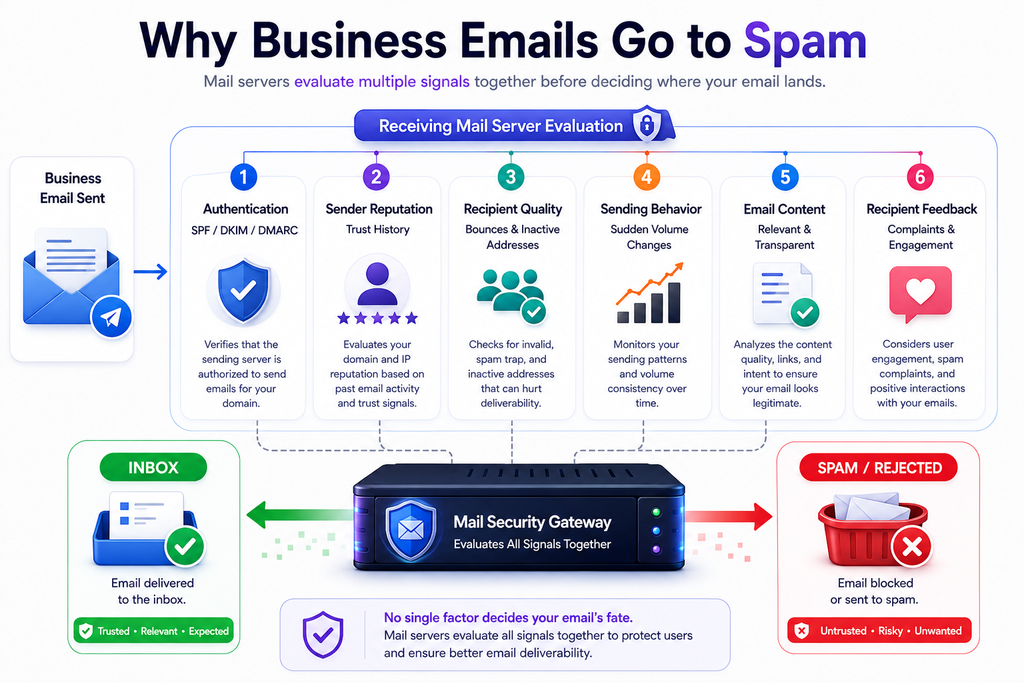
When troubleshooting email deliverability, check these areas first:
| Problem | Why It Matters | Practical Fix |
|---|---|---|
| Missing SPF | Sending source may not be authenticated | Configure the correct SPF record |
| Missing DKIM | Messages lack strong domain authentication | Enable DKIM signing |
| Missing/poor DMARC | Domain-level authentication policy is weak | Configure DMARC and monitor reports |
| High bounce rate | Indicates poor list quality | Remove invalid addresses |
| Spam complaints | Strong negative reputation signal | Improve targeting and relevance |
| Purchased lists | Recipients may not expect messages | Use permission-based lists |
| Sudden volume spike | Unusual behavior may trigger filtering | Increase volume gradually |
| Compromised account | Attackers may send unwanted email | Secure accounts and investigate activity |
| Poor content | Messages may appear suspicious | Use clear, relevant content |
| Inconsistent sending | Can create unpredictable patterns | Maintain responsible sending practices |
A Practical Email Deliverability Checklist
Before increasing business email volume, review the following:
- SPF is configured correctly.
- DKIM signing is enabled.
- DMARC is configured and monitored.
- DNS records match the current email infrastructure.
- Sending domains are legitimate and consistent with the business.
- SMTP credentials and mail accounts are protected.
- Invalid addresses are removed.
- Unsubscribe requests are respected.
- Email content accurately represents the sender.
- Sending volume changes are controlled.
- Transactional and marketing messages are logically separated.
- Bounce and complaint rates are monitored.
- Unexpected sending activity is investigated.
- Website links used in emails lead to secure, legitimate pages.
How Email Deliverability Can Affect Business Growth.
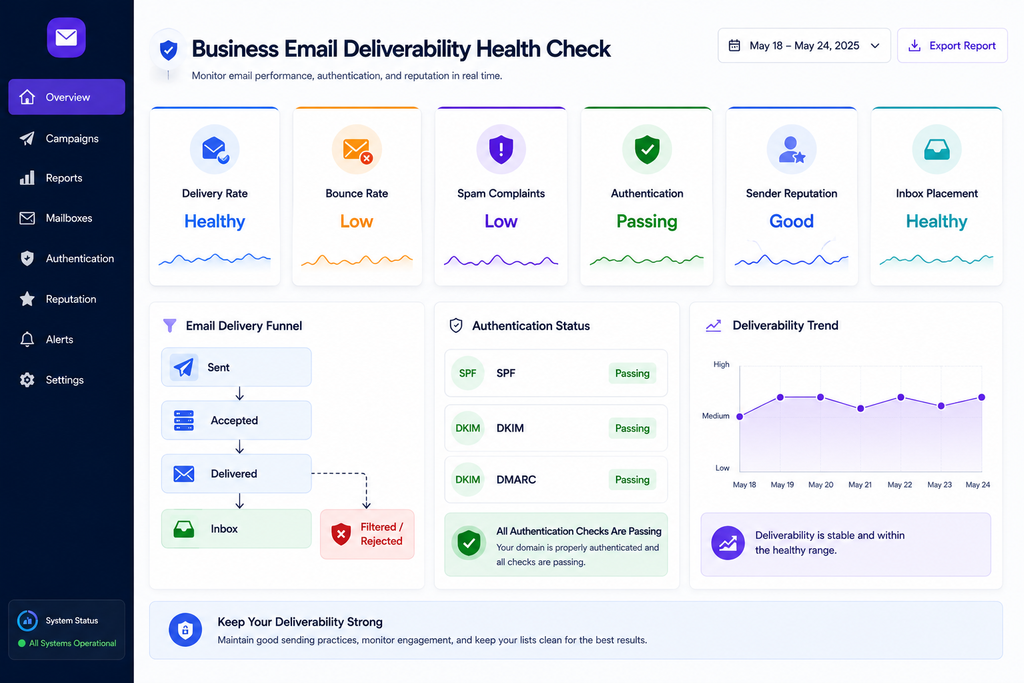
Email deliverability ultimately affects whether your communication reaches the people it was intended for.
Imagine an online business launching a new product. The company prepares a campaign for 20,000 customers, but technical authentication problems and poor list hygiene cause a significant portion of messages to be filtered or rejected.
The campaign may appear unsuccessful even though the underlying offer is strong.
The problem is not necessarily the product, pricing, or marketing strategy.
The message simply did not reach enough of the intended audience.
The same principle applies to transactional communication. A delayed account notification, missing password-reset email, or failed order confirmation can create unnecessary customer-support requests and reduce trust.
That is why deliverability should be treated as part of the overall digital customer experience.
Final Thoughts: Prioritize the Foundations First
Learning how to improve business email deliverability does not require chasing a single secret spam-filtering trick.
Start with the fundamentals:
- Authenticate your domain with SPF, DKIM, and DMARC.
- Maintain clean and permission-based recipient lists.
- Keep bounce and complaint rates under control.
- Send relevant, transparent messages.
- Avoid sudden and unexplained volume changes.
- Monitor delivery and authentication results.
- Secure email accounts, credentials, and infrastructure.
- Keep your website and email identity consistent.
- Separate transactional and marketing communication where appropriate.
- Investigate delivery problems as soon as unusual patterns appear.
Reliable email delivery is a combination of technical configuration, sender reputation, security, content quality, and responsible sending practices.
Businesses that build these foundations are in a much stronger position to communicate consistently with customers and protect the trust associated with their domain.
For organizations evaluating business email infrastructure, BulkMX can be considered as part of the broader conversation around managing business email and mailbox infrastructure.