Choosing an email service may seem like a small decision when starting or growing a business. After all, email is just a way to communicate, right?
Not quite.
The email address a business uses can influence how customers perceive the company, how securely information is handled, how employees collaborate, and how easily the organization can manage its communications as it grows.
For example, there is a noticeable difference between receiving a message from [email protected] and one from [email protected]. Both addresses can deliver an email, but they communicate very different things about the organization behind them.
This is why the business email vs Gmail question matters for startups, freelancers, agencies, ecommerce businesses, professional service providers, and established companies.
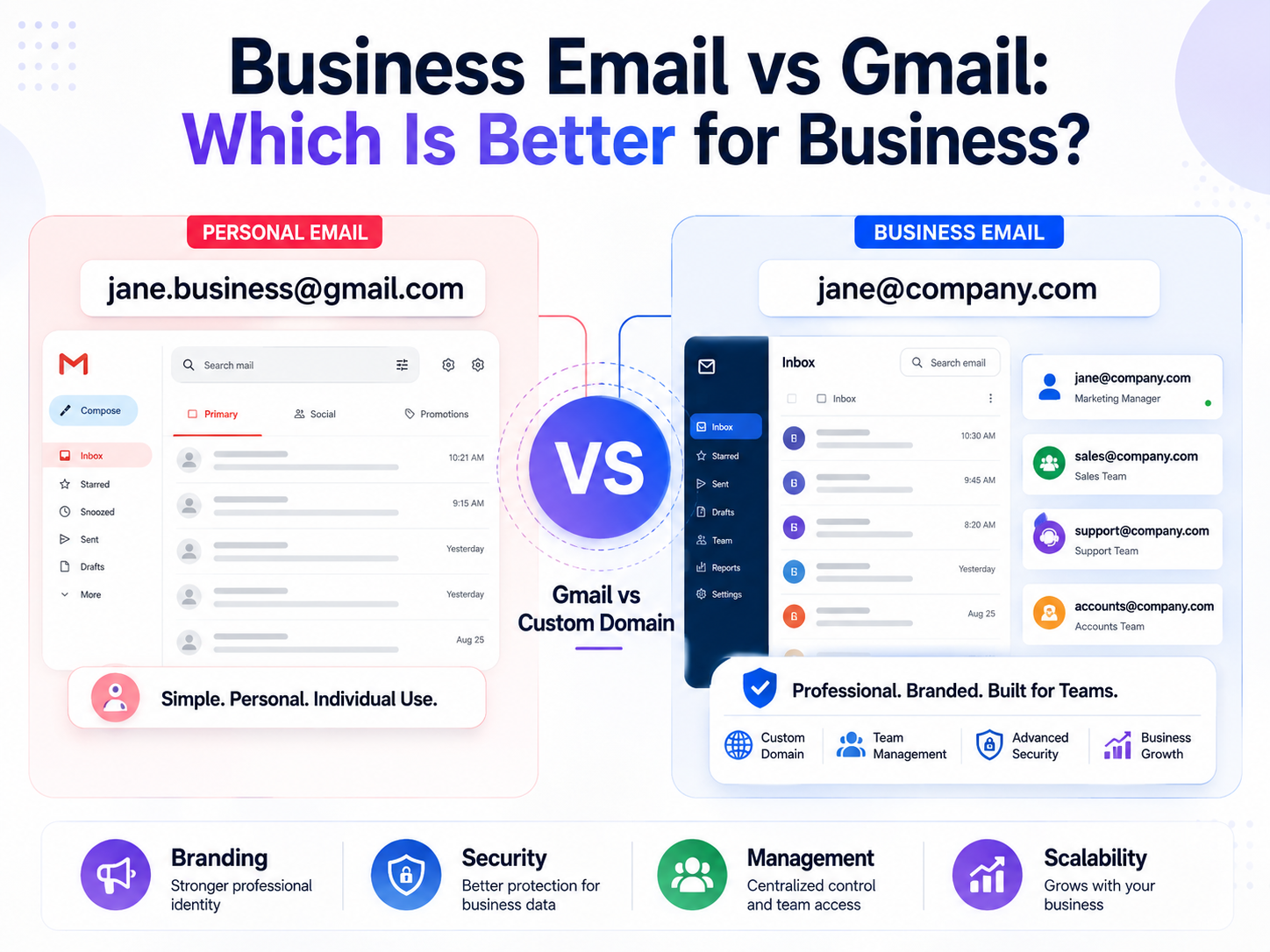
Gmail is convenient, familiar, and powerful. A professional business email, however, gives an organization greater control over its identity, domain, administration, and communication infrastructure.
The better option depends on what a business needs.
This guide compares business email and Gmail across branding, security, management, collaboration, cost, scalability, and customer trust so you can make a practical decision.
Quick answer: Gmail is excellent for personal communication and businesses that use Google Workspace. A professional business email address using your own domain is generally the better choice for establishing a professional brand identity. The two are not necessarily competitors: a business can use Gmail’s interface and Google Workspace while still having a professional address such as
[email protected].
For businesses that are also reviewing their broader online security, resources such as BulkMX website security resources can be useful when evaluating how email, websites, accounts, and other digital assets should be protected.
Business Email vs Gmail: What Is the Difference?
Before comparing the two, it helps to clarify what people mean by “business email” and “Gmail.”
What is Gmail?
Gmail is Google’s email service. A standard Gmail account typically uses an address ending in:
@gmail.com
For example:
A personal Gmail account can be used for business activities, particularly by freelancers and very small businesses. It provides useful features such as spam filtering, search, attachments, contacts, and integration with other Google services.
However, a personal Gmail address does not use the company’s own domain.
What is a business email?
A business email uses a company’s domain name.
For example:
The email hosting itself can be provided by different services. Google Workspace, Microsoft 365, Zoho, and other providers can host professional email accounts.
This distinction is important.
Business email does not necessarily mean abandoning Gmail.
A company can use Google Workspace and have employees send and receive messages through Gmail while using addresses such as [email protected].
So, when comparing business email vs Gmail, the more useful comparison is often:
Personal Gmail address vs professional email using your own business domain.
1. Professional Branding: Your Email Address Represents Your Business
One of the biggest differences is branding.
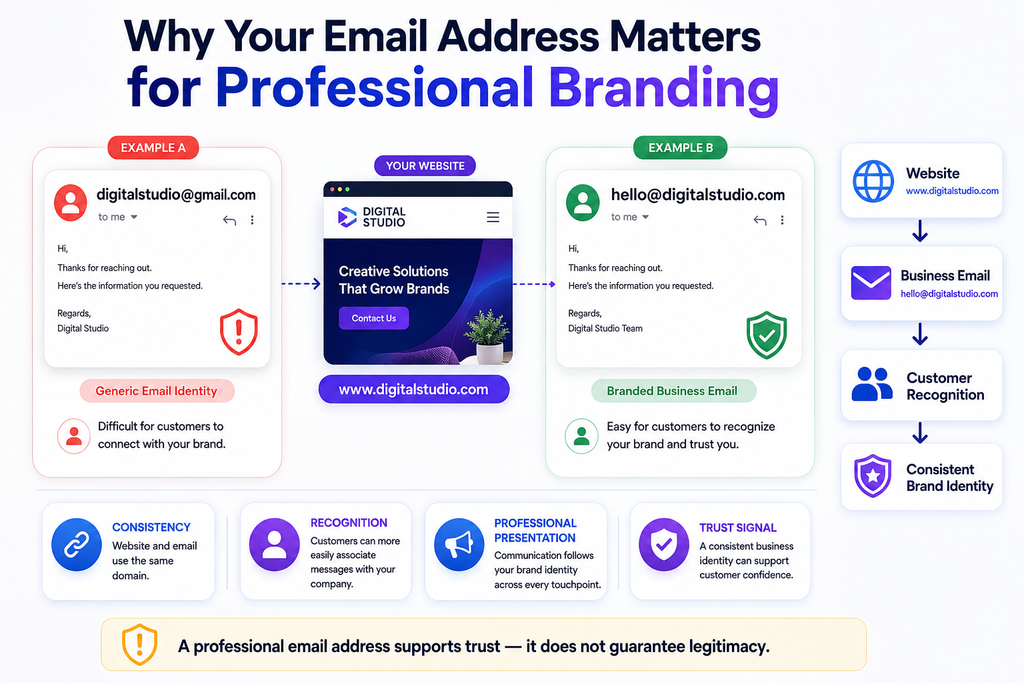
Imagine two companies contacting a potential client.
Company A:
Company B:
The second address immediately reinforces the company’s domain and brand.
That doesn’t automatically make Company B more trustworthy, but it creates a more professional and consistent impression.
Why domain-based email matters
A company domain can reinforce branding across multiple communication channels.
For example:
Website:www.example.com
Email:[email protected]
Support:[email protected]
Sales:[email protected]
This consistency makes it easier for customers to recognize legitimate company communications.
It can also become particularly important when employees communicate with prospects, vendors, partners, and customers.
Instead of every employee using a different personal email provider, the organization can establish a consistent structure.
For example:
or
This becomes part of the company’s digital identity.
2. Customer Trust: Does Business Email Look More Credible?
Trust is difficult to measure because customers make judgments based on many factors.
Still, email addresses can influence perception.
Consider receiving an invoice from:
versus:
The second address is easier to associate with the company website and brand.
This becomes even more important for businesses that handle:
- Customer inquiries
- Payments
- Contracts
- Invoices
- Account information
- Business proposals
- Support requests
- Sensitive documents
A professional email address doesn’t guarantee that a company is legitimate. Scammers can also use compromised or spoofed domains.
However, using a consistent company domain makes it easier for customers to understand which communication channels officially belong to the organization.
3. Security: Business Email Requires More Than an Inbox
Security is one of the most important considerations in the business email vs Gmail discussion.
Email accounts can contain valuable information, including:
- Customer conversations
- Contracts
- Password reset messages
- Financial documents
- Internal discussions
- Business proposals
- Personal information
- Access links to other services
A compromised mailbox can therefore become more than an email problem.
Gmail security
Google provides security features for Gmail and Google Workspace, including spam filtering, phishing protection, account security controls, and multi-factor authentication options.
However, the level of protection also depends on how the account is configured and used.
For example, using a weak password, ignoring suspicious login alerts, or failing to enable additional authentication can increase risk.
Business email security
A professional email setup gives organizations the opportunity to establish policies across employee accounts and domains.
Businesses should consider implementing:
- Multi-factor authentication
- Strong password policies
- Account recovery controls
- Role-based administrative access
- SPF
- DKIM
- DMARC
- Regular account reviews
- Employee security awareness training
SPF, DKIM, and DMARC are particularly important for organizations sending email from their own domains because they help receiving mail systems evaluate whether messages are authorized and whether they have been authenticated correctly.
For broader application and web security guidance, OWASP provides widely used resources covering common security risks and defensive practices.
Security is not determined by the word “Gmail”
A common mistake is thinking that Gmail is automatically insecure because it is free, or that a custom business email is automatically secure because it uses a company domain.
Neither assumption is correct.
Security depends on the provider, configuration, authentication methods, policies, employee behavior, and ongoing maintenance.
4. Control and Administration
This is where business email becomes particularly useful as a company grows.
Suppose a company has five employees.
At first, everyone may simply use individual Gmail accounts.
Then the company grows to 30 employees.
Someone leaves.
Another employee joins.
A customer needs to contact support.
An administrator needs to reset an employee’s account.
The business now needs more centralized control.
With managed business email, administrators can typically manage:
- User accounts
- Access permissions
- Email addresses
- Groups
- Shared mailboxes
- Security settings
- Account recovery
- Employee onboarding
- Employee offboarding
This can be much easier than relying on individual personal accounts.
For example, if an employee leaves the organization, the company should be able to disable access to the business account without depending on that employee to hand over a personal Gmail account.
This is especially important for businesses where customer relationships and company information must remain with the organization.
5. Scalability: What Happens When the Company Grows?
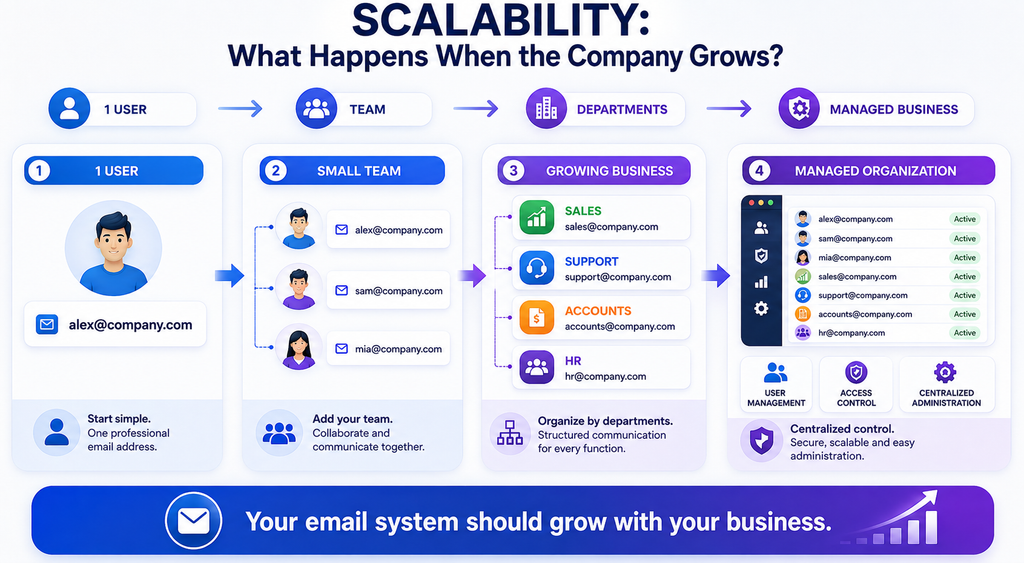
A personal Gmail account may be perfectly adequate when you’re working alone.
But business requirements tend to change.
A company may eventually need:
A domain-based email system makes this structure possible.
Instead of creating unrelated email identities, the company can build a consistent communication system around its domain.
Example
A small consulting business starts with:
After establishing its brand, it moves to:
As the business grows:
[email protected][email protected][email protected][email protected]
The email system grows alongside the organization.
6. Collaboration: Gmail Can Still Be Excellent for Business
There is an important misconception that choosing business email means giving up Gmail.
That’s not necessarily true.
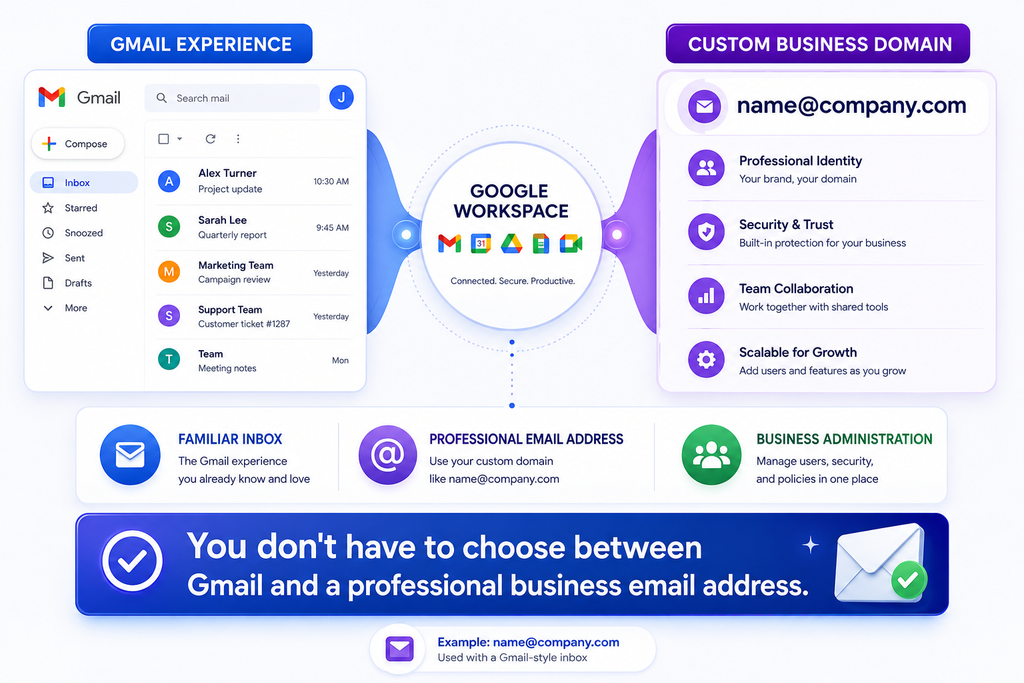
Google Workspace allows businesses to use Google’s familiar Gmail interface with custom business domains.
This means an employee can see an inbox that looks and works much like Gmail while using an address such as:
Depending on the organization’s plan and setup, businesses can also use other Google Workspace tools for collaboration and productivity.
This makes Google Workspace an attractive option for organizations that like Google’s ecosystem but want professional email addresses and administrative controls.
So the real question isn’t always:
“Business email or Gmail?”
It can instead be:
“Should we use personal Gmail accounts or managed business email, and which provider should host it?”
That is a much more useful question.
7. Cost: Free Gmail vs Paid Business Email
Cost is another major consideration.
A personal Gmail account can be created without paying for a standard mailbox, which makes it attractive to freelancers, students, and people starting small projects.
Business email services generally involve recurring costs.
Depending on the provider, pricing may vary according to:
- Number of users
- Storage
- Collaboration features
- Security controls
- Administrative tools
- Support
- Compliance requirements
- Additional productivity applications
A small business should therefore consider the value of the service rather than looking only at the monthly price.
For example, saving a small amount on email may not be worthwhile if the organization later struggles with account management, employee access, domain reputation, or business continuity.
8. Deliverability: Will Customers Receive Your Emails?
Professional email also requires attention to email deliverability.
Imagine a business sends:
- Invoices
- Order confirmations
- Appointment details
- Password-related notifications
- Customer support responses
If legitimate messages repeatedly land in spam folders, communication can suffer.
This is why domain authentication matters.
SPF
Sender Policy Framework helps identify which servers are authorized to send email for a domain.
DKIM
DomainKeys Identified Mail adds a cryptographic signature to messages so receiving systems can verify that the message is associated with an authorized sending domain and hasn’t been altered in transit.
DMARC
Domain-based Message Authentication, Reporting, and Conformance builds on SPF and DKIM and allows domain owners to specify how receiving systems should handle messages that fail authentication checks.
Businesses should configure these records carefully rather than simply adding them without understanding their impact.
For technical details on web and internet standards, MDN Web Docs is another useful reference for developers and technical teams.
9. Personal Gmail Is Not the Same as a Business Email System
A common setup for a new business is:
There is nothing inherently wrong with using Gmail temporarily.
It may make sense when:
- You’re testing a business idea
- You’re working alone
- You haven’t purchased a domain yet
- Your email needs are extremely simple
- You’re communicating mainly with a small number of contacts
But as the company becomes more established, the limitations become more noticeable.
For example, if five employees all communicate from different personal accounts, customers may have difficulty identifying official company communication.
A domain-based setup creates a clearer structure.
10. What About Small Businesses and Freelancers?
Not every business needs an expensive or complicated email infrastructure.
A freelancer may have completely different requirements from a 500-person organization.
A freelancer might start with:
This can be practical during the early stage.
Once the freelancer establishes a professional website and brand, switching to:
may create a more consistent professional identity.
A growing business may need:
- Multiple employee accounts
- Shared addresses
- Administrative controls
- Better security policies
- Centralized account management
- Domain authentication
- Collaboration tools
- Employee onboarding and offboarding
The right solution should match the actual requirements rather than simply choosing the most expensive option.
11. Business Email vs Gmail: Comparison Table
| Feature | Personal Gmail | Business Email |
|---|---|---|
| Custom domain | No | Yes |
| Professional branding | Limited | Stronger |
| Central administration | Limited | Available with managed services |
| Employee account management | Not designed for organizations | Designed for organizations |
| Domain-based addresses | No | Yes |
| Collaboration | Available | Available depending on provider |
| Security controls | Strong consumer features | More organization-focused controls |
| Scalability | Limited for business administration | Better suited to growing teams |
| Cost | Free option available | Usually paid |
| Best suited for | Personal use, early-stage work | Businesses and professional teams |
The table highlights an important point: business email is not automatically a completely different technology from Gmail.
In many cases, Gmail can be the interface while a business domain provides the professional identity.
12. Which Is Better for Your Business?
The answer depends on where your business is today.
Choose personal Gmail if:
- You’re experimenting with an idea
- You’re a solo freelancer
- Your business communication is limited
- You don’t yet have a domain
- You need a simple temporary solution
Choose professional business email if:
- You have an established business website
- Customers regularly contact you
- You have employees
- You need multiple addresses
- You want consistent branding
- You need centralized administration
- Your business handles sensitive information
- You want stronger control over employee accounts
Consider Google Workspace if:
You like Gmail but want a professional domain and business-oriented administration.
This can provide a familiar Gmail experience without requiring employees to use @gmail.com addresses for company communication.
13. Security Mistakes Businesses Should Avoid
Whatever provider you choose, email security should be treated as part of the organization’s wider security strategy.
Avoid these common mistakes:
Using one password everywhere
If the password is exposed through another service, attackers may attempt to use it to access the email account.
Ignoring multi-factor authentication
Passwords alone provide weaker protection than passwords combined with another authentication factor.
Giving everyone administrator access
Administrative privileges should be limited to people who genuinely need them.
Forgetting former employee accounts
When employees leave, their access should be reviewed and disabled according to company procedures.
Not configuring domain authentication
Businesses sending mail from their own domains should properly configure SPF, DKIM, and DMARC.
Clicking suspicious email links
Even advanced email security systems cannot eliminate every form of social engineering.
Employee awareness remains an important part of security.
14. Email Security Is Part of Your Wider Digital Security
A business email account rarely exists in isolation.
It may be connected to:
- Website administration
- Social media accounts
- Cloud storage
- Payment services
- CRM systems
- Hosting platforms
- Developer accounts
- Analytics tools
- Password recovery systems
If an attacker gains access to an employee’s email, they may attempt to reset passwords for other services.
That makes email security an important component of a broader cybersecurity strategy.
Businesses reviewing their overall digital exposure can also explore relevant BulkMX security guidance alongside their email security practices.
The goal isn’t simply to protect the inbox. It is to reduce the number of ways an attacker can move from one compromised account to another.
15. How to Set Up Professional Business Email
If you’ve decided to move away from personal Gmail, the process doesn’t need to be complicated.
Step 1: Own a business domain
For example:
yourcompany.com
Step 2: Select an email provider
Choose a provider based on:
- Pricing
- Storage
- Security
- Administration
- Collaboration requirements
- Support
- Scalability
Step 3: Create your accounts
For example:
Step 4: Configure DNS records
Your domain’s DNS configuration will generally need appropriate mail-related records.
This may include MX records and authentication records such as SPF, DKIM, and DMARC.
Step 5: Enable security controls
Set up multi-factor authentication and appropriate administrative policies.
Step 6: Test delivery
Send messages to several external providers and verify that legitimate messages arrive correctly.
Step 7: Establish internal policies
Define how employees should handle:
- Suspicious messages
- Attachments
- Password resets
- Account access
- Former employee accounts
- Sensitive documents
A good email setup combines technology with sensible processes.
16. The Best Choice Isn’t Always “Business Email vs Gmail”
The comparison can sound like an either-or decision, but modern business email doesn’t have to work that way.
A business can have:
Professional domain + Gmail interface + business administration
For many organizations, this is an attractive combination.
The important distinction is between using a personal @gmail.com identity for company communication and using a managed email system connected to the company’s own domain.
If the business already has a website, the domain is one of its most valuable digital assets. Using that same domain for email creates a consistent identity across the customer journey.
A visitor may discover:
www.company.com
Then contact:
Then receive support from:
That consistency makes the company’s digital presence easier to recognize and manage.
Frequently Asked Questions
Is Gmail good enough for a small business?
Yes, a personal Gmail account can be sufficient for a freelancer or very early-stage business. However, a professional domain-based email becomes more useful as the business develops a customer base, hires employees, and establishes a formal brand.
Is business email more secure than Gmail?
Not automatically. Security depends on the provider, configuration, authentication, account policies, and user behavior. A properly managed business email environment can provide stronger organizational controls than individual personal accounts.
Can I use Gmail with a business email address?
Yes. Services such as Google Workspace allow organizations to use Gmail with custom domain addresses such as [email protected].
Does a business email improve customer trust?
A professional domain can create a more consistent and credible brand presentation, particularly when it matches the company’s website. It should be considered one part of building trust rather than a guarantee of credibility.
Is business email worth paying for?
For an established company, the benefits of professional branding, centralized management, security controls, and scalability can make paid business email worthwhile. For a solo user with very basic needs, personal Gmail may be sufficient.
Should every employee have a company email address?
For most established businesses, yes. Company-managed accounts make it easier to maintain consistent communication, control access, and handle employee onboarding and offboarding.
Final Thoughts
The business email vs Gmail decision is less about choosing between two inboxes and more about deciding how your company wants to manage its digital identity.
Personal Gmail is convenient, familiar, and useful for individuals and very small operations. But once a business has a website, employees, customers, and ongoing operations, a domain-based email system usually makes more sense.
The biggest advantages are consistency, professional branding, centralized administration, scalability, and greater control over security.
And remember: using a business email address doesn’t mean giving up Gmail. A company can use Google Workspace and retain the Gmail experience while communicating through a professional domain.
Whatever provider you choose, protect the accounts with strong authentication, configure domain security correctly, review access regularly, and train employees to recognize suspicious messages.
Email is one of the most important communication channels a business owns. Treating it as part of the company’s broader digital security strategy can help protect not only conversations, but also the systems and data connected to them.
For businesses looking beyond email toward broader website and digital security, Botdef’s security resources can be a useful next step.