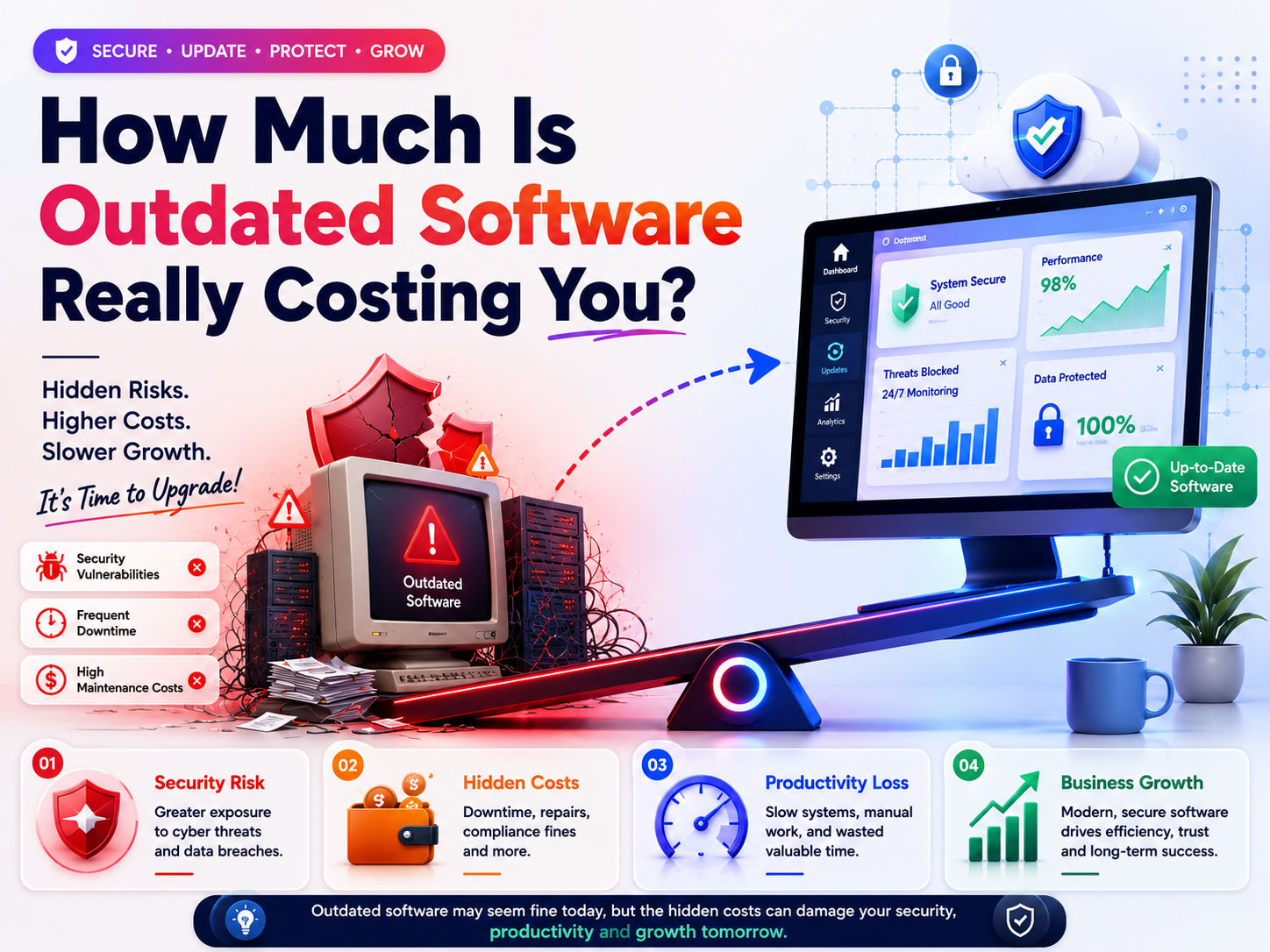
In today’s digital world, staying secure isn’t just an option—it’s a necessity. Businesses of every size rely on software to manage operations, protect customer information, improve productivity, and maintain a competitive edge. However, one issue continues to quietly undermine these goals: outdated software.
Many organizations postpone software updates because everything appears to be working fine. After all, why invest time or money into upgrading something that isn’t visibly broken? Unfortunately, this mindset often leads to hidden costs that accumulate over time—from cybersecurity risks and compliance violations to productivity losses and expensive emergency fixes.
If you regularly explore cybersecurity insights through the Botdef cybersecurity platform, you’ll notice that many security incidents begin with vulnerabilities that were already known but never patched. Understanding these risks is the first step toward building a stronger security posture.
This article explores how much outdated software is really costing you, the hidden risks businesses often overlook, and practical strategies to modernize your technology without disrupting operations.
What Is Outdated Software?
Outdated software refers to applications, operating systems, frameworks, or tools that:
- No longer receive security updates
- Have reached end-of-life (EOL)
- Run on unsupported versions
- Miss important performance improvements
- Lack compatibility with modern technologies
Examples include:
- Older Windows Server versions
- Unsupported Linux distributions
- Legacy ERP systems
- Old CRM platforms
- Unpatched content management systems
- Expired plugins and browser extensions
Even software that appears functional may contain vulnerabilities discovered years after its release.
Why the Cost of Outdated Software Is Higher Than You Think
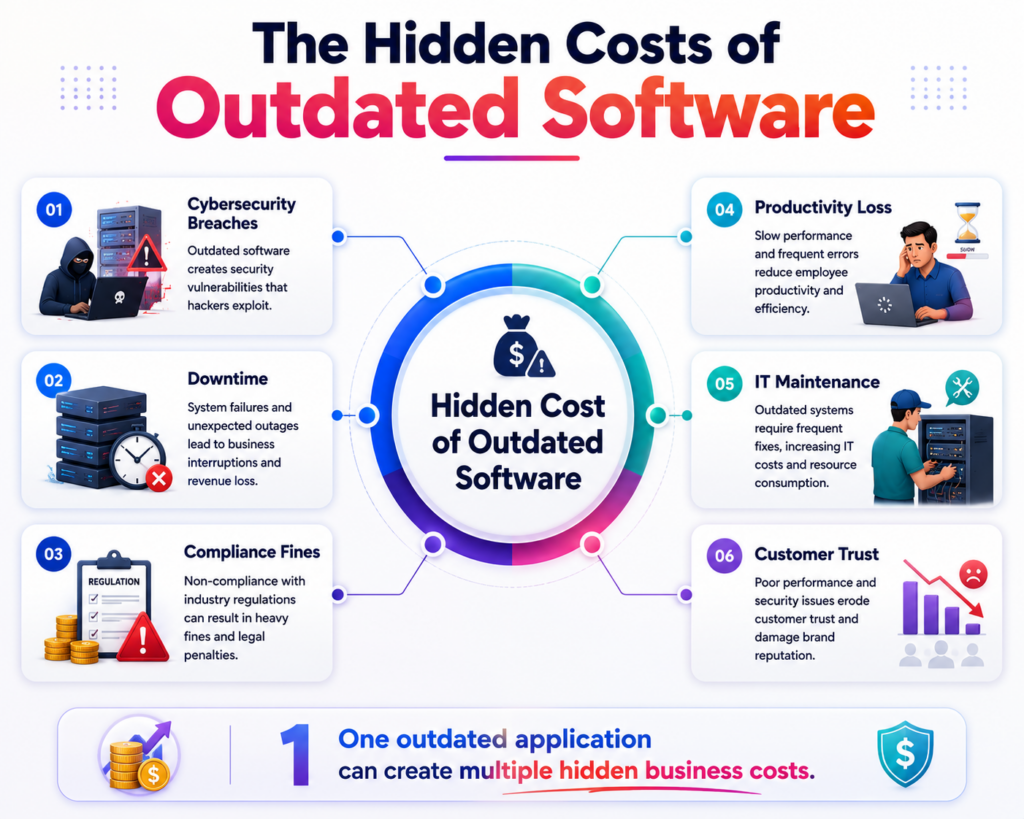
When organizations think about software costs, they usually focus on license fees. However, outdated software creates numerous hidden expenses that rarely appear on a budget sheet.
These include:
- Security breaches
- Downtime
- Compliance penalties
- Reduced employee productivity
- Customer trust issues
- Emergency recovery expenses
- Increased IT maintenance
- Compatibility problems
Individually these may seem manageable, but together they can significantly impact business performance.
The Cybersecurity Risks of Outdated Software
The most serious consequence of outdated software is increased exposure to cyberattacks.
Cybercriminals actively search for systems running older software because publicly disclosed vulnerabilities are often easy to exploit.
According to the CISA Known Exploited Vulnerabilities Catalog, many real-world attacks target vulnerabilities that already have available patches.
When software isn’t updated, organizations leave these known weaknesses exposed.
Common attacks include:
- Remote code execution
- Ransomware infections
- Credential theft
- Privilege escalation
- Data exfiltration
- Web application compromise
Attackers rarely need sophisticated techniques if organizations fail to install existing security updates.
How Hackers Exploit Legacy Systems
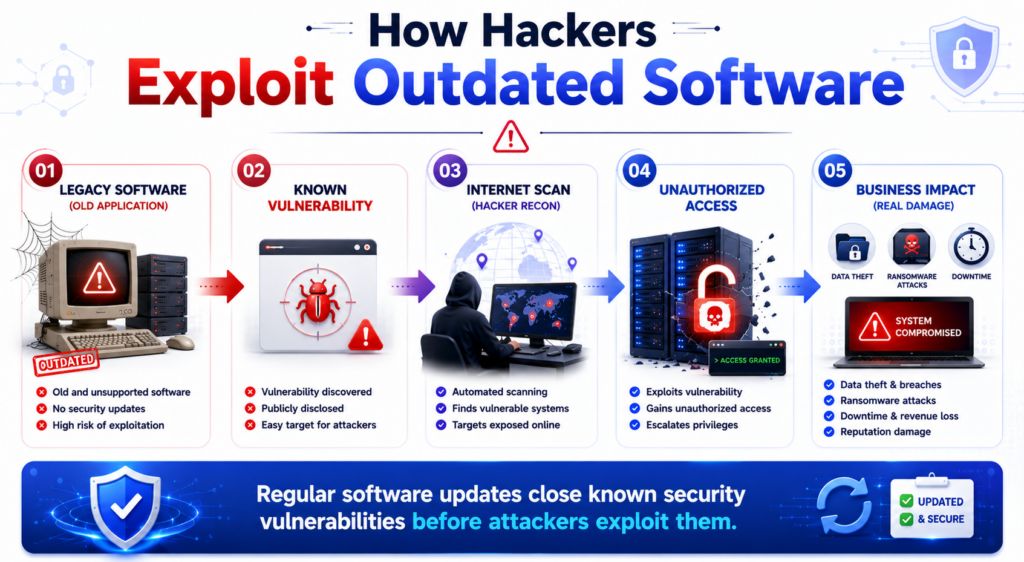
Older systems often contain:
- Weak encryption
- Outdated authentication methods
- Unsupported libraries
- Missing security patches
- Vulnerable third-party components
Hackers automate internet-wide scans looking specifically for these weaknesses.
Once found, they can gain access within minutes.
Financial Costs Beyond Software Licensing
The cost of outdated software extends far beyond maintenance contracts.
Consider the financial impact of a successful breach.
Expenses may include:
- Incident response
- Digital forensics
- Business interruption
- Customer notification
- Legal fees
- Regulatory fines
- Data recovery
- Infrastructure rebuilding
- Cyber insurance claims
- Reputation management
For many organizations, these expenses exceed the cost of upgrading software many times over.
Productivity Losses That Often Go Unnoticed
Outdated applications frequently become slower over time.
Employees experience:
- Longer loading times
- Frequent crashes
- Compatibility errors
- Manual workarounds
- File conversion problems
- Slow integrations
Although each delay may seem small, multiplied across hundreds of employees and thousands of workdays, the productivity loss becomes substantial.
Even saving five minutes per employee each day can translate into hundreds of productive hours annually.
Compliance Risks Continue to Grow
Many industries must comply with regulations involving cybersecurity and data protection.
Examples include:
- GDPR
- HIPAA
- PCI DSS
- ISO 27001
- SOC 2
Using unsupported software can violate security requirements because vendors no longer provide updates or security fixes.
Organizations may fail audits simply because critical systems are running obsolete software.
Businesses interested in strengthening their overall cybersecurity governance can also explore additional security best practices in the Botdef security blog, where topics such as vulnerability management, threat detection, and modern security strategies are discussed in greater detail.
Customer Trust Is Hard to Rebuild
Customers expect businesses to protect their information.
A breach caused by outdated software doesn’t just affect operations—it damages confidence.
Customers may:
- Stop using your services
- Leave negative reviews
- Choose competitors
- Reduce long-term engagement
Trust takes years to build but only one incident to lose.
Increased IT Maintenance Costs
Legacy software often requires special attention.
IT teams spend excessive time:
- Troubleshooting compatibility issues
- Maintaining custom fixes
- Supporting outdated hardware
- Finding replacement parts
- Managing unsupported environments
Instead of focusing on innovation, teams remain occupied maintaining aging infrastructure.
This increases operational costs over time.
Compatibility Problems Across the Organization
Modern business tools evolve rapidly.
Older software may not integrate with:
- Cloud platforms
- Identity providers
- Collaboration tools
- Modern databases
- APIs
- Security monitoring solutions
As a result, organizations create manual processes that reduce efficiency.
Integration projects become more expensive than necessary.
Why Delaying Updates Creates Bigger Problems
Many organizations delay upgrades because:
- Budgets are limited
- Downtime is feared
- Legacy applications are business-critical
- Teams lack resources
Unfortunately, postponing updates often makes future migrations significantly harder.
Years of accumulated technical debt eventually require larger investments.
Regular incremental updates are usually less expensive than complete system replacements.
Hidden Costs of Technical Debt
Technical debt accumulates when organizations postpone improvements.
Symptoms include:
- Complex codebases
- Unsupported frameworks
- Duplicate processes
- Security gaps
- Performance bottlenecks
Technical debt slows development, increases maintenance costs, and limits business agility.
Eventually, innovation becomes difficult because every change carries greater risk.
Real-World Example
Imagine a mid-sized organization running an unsupported customer management system.
Initially, everything works.
Over time:
- Security patches stop arriving.
- Browsers become incompatible.
- Employees experience frequent crashes.
- Integrations fail.
- Customer records become difficult to access.
Then a vulnerability is exploited.
The organization experiences:
- Three days of downtime
- Lost customer confidence
- Regulatory investigations
- Emergency consultant fees
- Revenue loss
The upgrade they delayed for years suddenly becomes far more expensive than originally planned.
Warning Signs Your Software Needs Immediate Attention
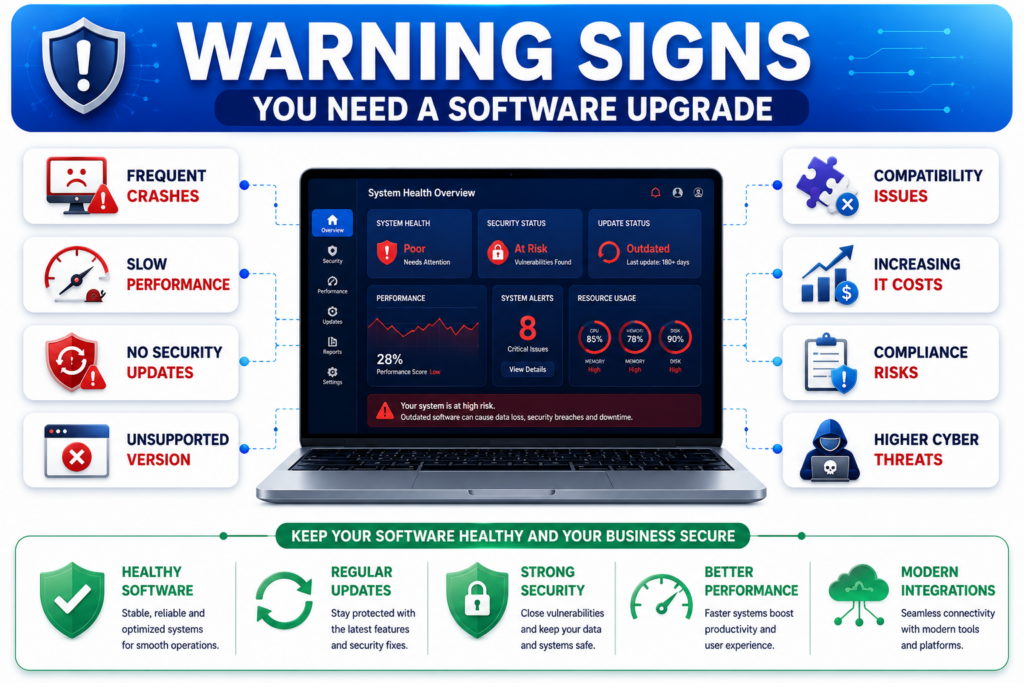
Watch for these indicators:
- Vendor support has ended
- Security updates are unavailable
- Frequent application crashes
- Increasing IT support tickets
- Slow system performance
- Compatibility warnings
- Unsupported operating systems
- Missing modern authentication features
Ignoring these warning signs increases organizational risk.
Best Practices to Reduce the Cost of Outdated Software
1. Maintain a Software Inventory
Know exactly:
- Which applications are installed
- Current versions
- Licensing status
- Support lifecycle
Visibility enables better planning.
2. Automate Patch Management
Automated update systems reduce human error.
Prioritize:
- Operating systems
- Browsers
- Security tools
- Third-party libraries
Regular patching closes known vulnerabilities before attackers can exploit them.
3. Monitor Vendor End-of-Life Announcements
Plan upgrades before software reaches end-of-support.
This avoids rushed migrations during emergencies.
4. Perform Regular Vulnerability Assessments
Routine vulnerability scanning identifies outdated software before attackers do.
Security assessments should include:
- Servers
- Workstations
- Applications
- Cloud environments
- Containers
5. Train Employees
Employees should understand:
- Why updates matter
- How phishing exploits outdated software
- Safe installation practices
- Reporting suspicious behavior
Cybersecurity awareness complements technical controls.
6. Build an Upgrade Roadmap
Instead of reacting to emergencies, create a long-term modernization strategy.
Include:
- Budget planning
- Infrastructure replacement
- Cloud migration
- Application lifecycle management
Gradual modernization reduces operational disruption.
Why Software Modernization Is a Business Investment
Many organizations view software upgrades as expenses.
In reality, modernization improves:
- Security
- Productivity
- Reliability
- Customer satisfaction
- Compliance
- Innovation
Updated systems also simplify future technology adoption, allowing businesses to leverage automation, artificial intelligence, analytics, and cloud services more effectively.
Rather than simply preventing cyberattacks, modern software helps organizations remain competitive in an increasingly digital marketplace.
Final Thoughts
The cost of outdated software is far greater than most businesses realize. While delaying updates may appear to save money in the short term, the long-term consequences include security breaches, operational disruptions, compliance violations, productivity losses, and declining customer trust.
Keeping software current is not just an IT responsibility—it is a strategic business decision that protects revenue, reputation, and long-term growth. Organizations that regularly assess their technology stack, automate patch management, and proactively modernize legacy systems are far better positioned to respond to evolving cyber threats.
For businesses looking to stay informed about emerging cybersecurity threats, software vulnerabilities, and practical defense strategies, the Botdef cybersecurity resources provide valuable guidance for strengthening security across modern digital environments.